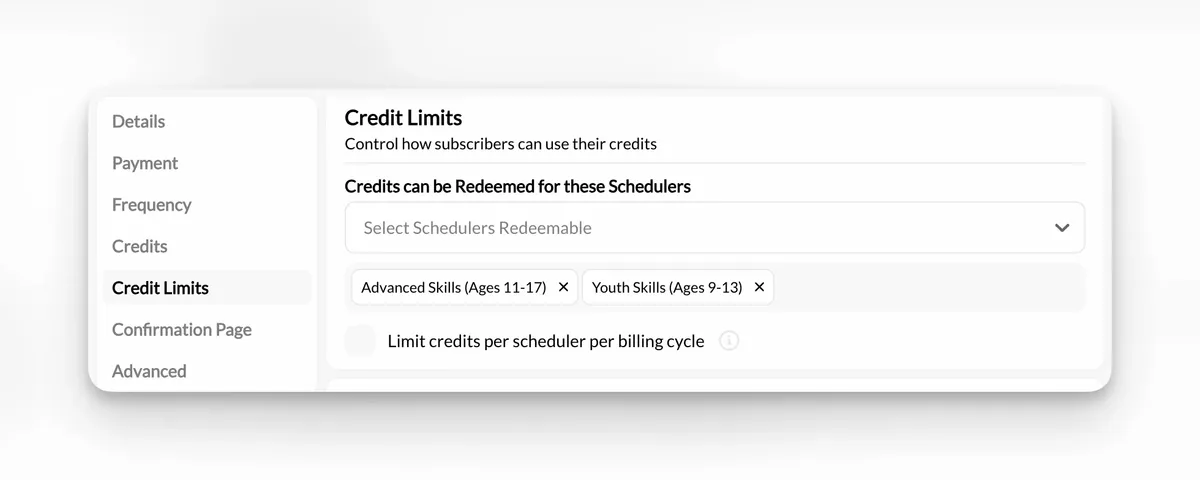
CoachIQ Credit Limits settings showing which Schedulers accept a training product
Guide

Credit-Based Booking System: A Guide for Training Facilities

Learn how a credit-based booking system connects session packs, scheduling, and payments so athletes can self-book while your facility gets paid upfront.

By CoachIQ August 19, 2026

Last updated: August 19, 2026

Quick answer: A credit-based booking system lets athletes buy a package or subscription before they choose every training time. The purchase adds Credits to the athlete's account, eligible Schedulers accept those Credits, and the balance updates as Sessions are booked. For a coach-led training facility, that connects payment, booking eligibility, and the athlete's remaining Sessions in one workflow.

If your front desk still checks a spreadsheet before answering “How many Sessions do I have left?”, the problem is not the spreadsheet alone. Your package sale and your schedule are disconnected.

A credit-based booking system closes that gap. An athlete can buy eight training Sessions today, book eligible times over the next several weeks, and see what remains without asking a coach to reconcile Venmo payments, calendar entries, and handwritten notes.

That does not mean every offer should use Credits. Drop-ins may be easier with direct payment. A fixed weekly team may fit a recurring booking. An unlimited membership needs capacity controls more than a visible Session count. The right model depends on what you sell and how much choice athletes have over when they train.

This guide explains how Credits work, which rules to decide before launch, and how to build the model in CoachIQ Scheduling.

What is a credit-based booking system?

A credit-based booking system is a scheduling and payment model in which an athlete prepays for booking rights, then redeems those rights for eligible services. In a sports training facility, one Credit may represent one group Session, while a private Session may require more than one Credit.

The system connects three records:

  • The product: what the athlete buys, such as an eight-Session pack or monthly training membership
  • The Credit balance: how many eligible bookings the athlete can still make
  • The Scheduler: which Session types accept those Credits and how many each booking requires

That connection is the important part. A digital punch card that staff must update manually is still a separate system. A true session credit system checks eligibility during booking and adjusts the balance when the booking is completed.

In CoachIQ, Credits are issued through products and used with eligible Schedulers. A facility can sell a one-time package, deliver new Credits through a subscription, restrict Credits to specific training offers, or let athletes choose between a Credit and direct payment.

How a credit-based booking system works

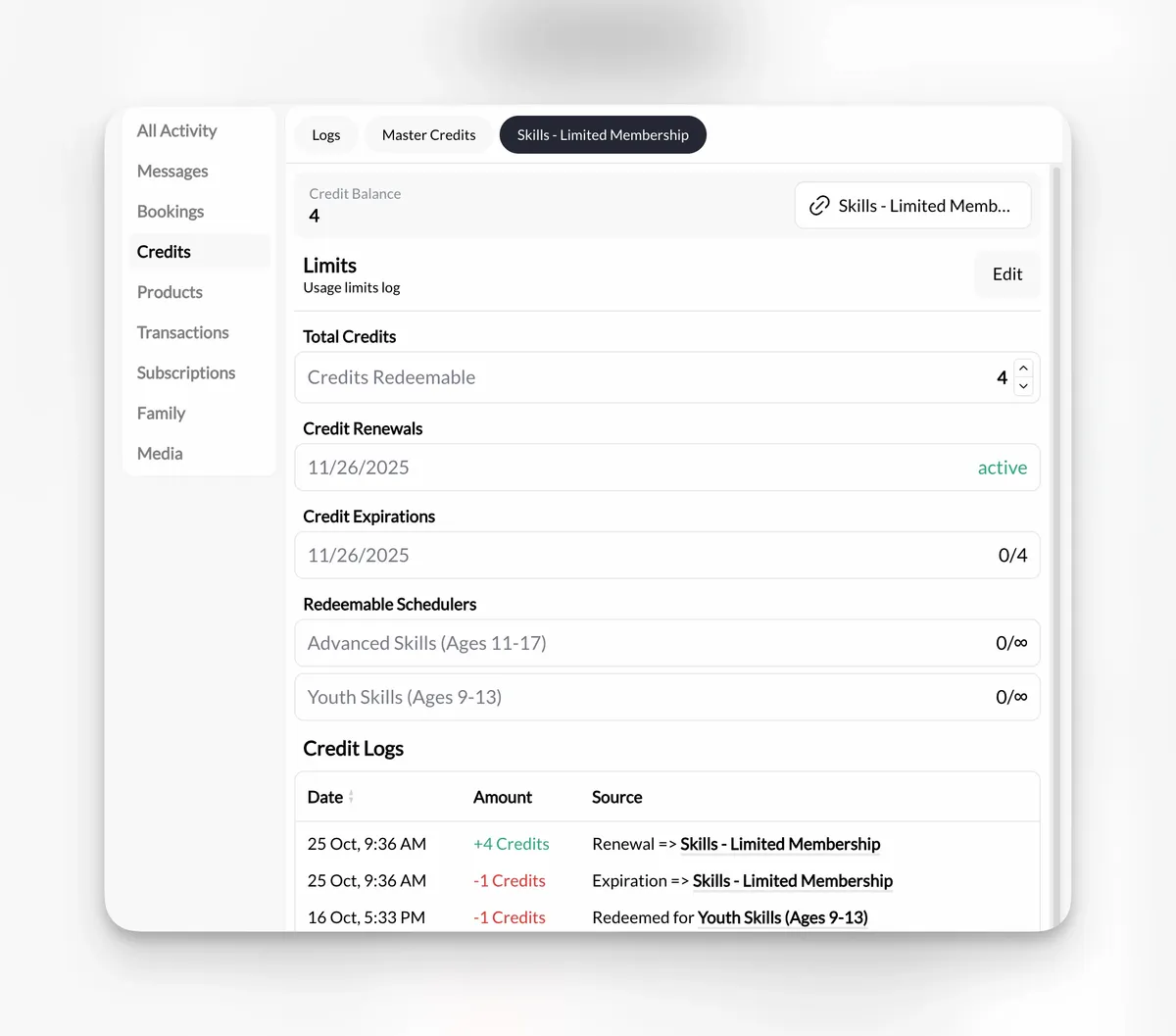
CoachIQ athlete Credit balance showing renewal, expiration, eligible Schedulers, and Credit history
CoachIQ keeps an athlete’s Credit balance, renewal date, expiration date, eligible Schedulers, and usage history in one account view.

The basic flow has five steps:

  1. The facility creates an offer. A product defines the price, number of Credits, expiration rule, and purchase type.
  2. The athlete buys the offer. A one-time package grants a set balance, while a subscription can issue Credits each billing period.
  3. The athlete chooses an eligible Session. The Scheduler checks whether the athlete has the right Credit type and enough Credits to book.
  4. The system applies the Credit. The booking is confirmed and the balance decreases according to the Scheduler's Credit cost.
  5. The athlete and staff see the remaining balance. The next booking begins with the current account record rather than a separate spreadsheet.

Consider a baseball facility that sells an eight-Session youth development package. The package issues eight Credits that work only on youth small-group Schedulers. An athlete can choose among the eligible times, but cannot apply the same Credits to a private pitching assessment or an adult open-cage Session.

That is more than prepaid payment. It is access control tied to the schedule.

Credits vs. direct payment, subscriptions, and hybrid booking

Credits are one payment model, not the default for every Scheduler. CoachIQ supports free, direct-payment, credit-based, and hybrid booking, so a facility can match the rule to the offer.

Model Athlete experience Best fit Main decision
Direct payment Pay each time a Session is booked Evaluations, drop-ins, one-off clinics Whether payment is required at booking
One-time Credit pack Pay once, then use a fixed number of Credits Private or group training packages Expiration and eligible Schedulers
Subscription with Credits Pay on a recurring schedule and receive Credits each billing period Ongoing memberships with a defined Session allowance Rollover, renewal, and unused Credits
Unlimited access Book eligible Sessions without a fixed count High-frequency memberships with controlled capacity Booking limits and fair-use rules
Hybrid booking Use a Credit or pay directly Facilities that serve members and occasional drop-ins Clear price and eligibility at checkout

A subscription and a Credit system are not opposites. The subscription controls when the athlete is charged. Credits control what the athlete may book after that charge. A monthly membership can issue four, eight, or unlimited Credits, depending on the training model.

For a broader look at the surrounding workflow, see sports scheduling software for coaches and training facilities.

Seven rules to decide before you launch Credits

The software setup is the easy part. The operating rules are where facilities prevent confusion.

1. What does one Credit represent?

Start with a plain sentence staff and athletes can repeat. For example: “One Credit books one 60-minute small-group Session.”

If different Sessions have different value, decide whether to use separate Credit types or different Credit costs. A 30-minute assessment, a 60-minute group, and a 90-minute private Session should not share a vague unit unless the math is intentional.

2. Which Schedulers accept each Credit?

Broad Credits give athletes flexibility. Restricted Credits protect the economics and capacity of specialized offers.

Use broad access when several Schedulers deliver roughly the same service. Use product-specific Credits when a package is tied to an age group, training format, coach, or program. CoachIQ lets a product limit its Credits to selected Schedulers in its usage settings.

3. When do Credits expire?

An expiration policy should give athletes a realistic booking window while keeping old obligations from accumulating indefinitely. Choose a rule that accounts for your schedule, season, and facility closures.

Then write the policy where athletes see it before purchase. Define the expiration date, whether extensions are possible, and what happens if the facility cancels a Session.

4. What happens after a cancellation or no-show?

Your cancellation window and your Credit policy must agree. If a timely cancellation returns a Credit but a late cancellation does not, state the cutoff in hours and apply it consistently.

Also decide how staff handle weather, coach illness, and facility closures. Those are facility-caused exceptions, not athlete cancellations.

5. Do unused subscription Credits roll over?

Rollover changes both the promise to the athlete and the capacity you may owe later. Choose one rule: expire at the end of the billing period, roll over without a cap, or roll over up to a defined limit.

There is no universally correct answer. The right rule is one your schedule can honor and your staff can explain without improvising.

6. Can family members share Credits?

Families with several athletes may expect one household balance. Decide whether Credits belong to the purchaser, one athlete, or a defined group of family members. Test the exact family workflow before advertising shared access.

7. Who can adjust balances?

Manual adjustments will happen: a facility cancellation, a migration correction, or a service recovery. Limit adjustment permissions, require a reason, and make sure staff know where to review the account history.

The goal is not to eliminate exceptions. It is to keep exceptions from becoming invisible edits.

How to design Session packages without guessing

Build packages from the training promise backward, not from a round number of Credits.

Start with four questions:

  1. How often should the athlete train?
  2. Over what period should those Sessions happen?
  3. Which Session types fulfill the promise?
  4. How much schedule capacity can the facility reliably offer?

An eight-Session package could support two Sessions per week for four weeks, one Session per week for eight weeks, or a flexible bank across a season. Those are different products even when the Credit count is identical.

Use simple names that describe the offer, such as “Eight Small-Group Sessions” or “Monthly Pitching Membership: Four Credits.” Avoid making athletes decode internal package labels.

Pricing does not need to include an automatic discount. If one Session is $75, a five-Session package can be $375 or a deliberate package price based on commitment, service costs, and demand. The important point is that the price, Credit count, eligible Schedulers, and expiration rule agree. CoachIQ's guide to pricing private training Sessions covers the broader pricing decision.

How to set up credit-based booking in CoachIQ

Once the operating rules are written, configure the two-way connection between the product and the Scheduler.

Step 1: Create the product

Choose the purchase structure in CoachIQ Products. A one-time product fits a fixed package. A subscription fits a recurring membership that renews and can issue new Credits each billing period.

Step 2: Turn on Credits

In the Product Builder, enable Credits and enter the amount the product should issue. Set the expiration rule that matches the published policy. For subscriptions, confirm how the Credit delivery aligns with the billing period.

Step 3: Define usage limits

Choose whether the Credits should work broadly or only on designated Schedulers. Product-specific restrictions are useful when a package belongs to one program, age band, or training format.

Step 4: Configure each Scheduler

Set the Scheduler's duration, capacity, coach and resource availability, booking window, cancellation rule, and payment options. If the Session requires more than one Credit, make that cost clear before athletes reach checkout.

CoachIQ's scheduling feature overview explains how Schedulers connect availability, Sessions, payments, coaches, and facility resources.

Step 5: Attach the purchase path

Make the product easy to find from the relevant Scheduler, website page, or Athlete Portal. The athlete should not have to leave the booking flow, search for a package, then guess which Session it unlocks.

Step 6: Test as an athlete

Use a test account to purchase the product, verify the Credit balance, book an eligible Session, attempt an ineligible Session, cancel within the allowed window, and confirm the resulting balance.

Do this on a phone. The athlete experience is the real acceptance test.

Credit-based booking launch checklist

Before announcing the package, verify:

  • The product name describes what the athlete receives
  • Price, Credit amount, and purchase frequency are correct
  • Expiration and rollover terms appear before checkout
  • Eligible Schedulers accept the correct Credit type
  • Ineligible Schedulers reject the Credit
  • Session capacity, coach availability, and facility resources are current
  • Cancellation and no-show rules match the published policy
  • The athlete can see the remaining balance
  • Staff know who may make manual adjustments
  • The complete mobile purchase and booking flow has been tested

Run the checklist again whenever you add a Scheduler or change a membership. A new offer can accidentally create a second path around rules that worked correctly at launch.
Common credit-system mistakes

Using one Credit for offers with very different value

When every Session costs one Credit, athletes will naturally choose the highest-value eligible option. Separate the Credit types or set different Credit costs when duration, capacity, or coaching level changes materially.

Selling more flexibility than the schedule can support

Credits create a future booking obligation. Before selling a large package, make sure eligible Sessions have enough capacity across the full expiration period.

Hiding the expiration rule

An expiration date buried after checkout creates avoidable disputes. Put it in the product description, terms, and confirmation flow.

Mixing Credits with an untracked spreadsheet

If some bookings deduct automatically while staff record others elsewhere, neither balance is reliable. Choose one account record and train the team to use it.

Choosing Credits when direct payment is simpler

Credits add a balance, eligibility rules, and exception handling. If most athletes buy one unpredictable Session at a time, direct payment may be the cleaner model. Use Credits when packages or memberships create a real benefit for the facility and athlete.

Frequently asked questions about credit-based booking systems

What is a Session Credit?

A Session Credit is a prepaid booking right stored in an athlete's account. The athlete applies it to an eligible Scheduler, and the balance decreases based on the Credit cost of that Session.

Are Credits the same as a membership?

No. A membership or subscription determines the recurring payment relationship. Credits determine how many eligible Sessions the athlete can book. A membership can issue Credits each billing period, offer unlimited access, or use another booking rule.

Can different Sessions require different numbers of Credits?

Yes. A facility may make a group Session cost one Credit and a longer or more individualized Session cost more. The conversion should be clear before purchase and booking.

Should unused Credits expire?

They can, but the policy should match the training cycle and available capacity. State the expiration rule before purchase and define how facility cancellations, medical exceptions, and subscription renewals are handled.

Can athletes pay directly if they do not have Credits?

Yes, when the Scheduler uses a hybrid payment model. That lets members redeem Credits while drop-in athletes pay directly for the same eligible Session.

When should a facility avoid Credits?

Avoid Credits when you sell only one-off Sessions, pricing changes heavily by booking, or your athletes follow fixed recurring bookings that staff create for them. Direct payment or a recurring membership without a Credit balance may be simpler.

Build the booking model around the way you coach

A credit-based booking system works when it makes the agreement visible: what the athlete bought, where it can be used, when it expires, and what remains.

For a coach-led facility, that agreement should connect to the rest of the operation—coaches, spaces, payments, communication, and the athlete record. CoachIQ brings those pieces together for independent coaches, training facilities, and multi-location operators. More than 750 sports coaches and facilities use the platform.

Review CoachIQ pricing, or book a free demo and bring one real package, Scheduler, and cancellation policy. We will map the Credit flow to the way your facility already trains athletes.

POWERED BY

CoachIQ Logo
