Before you open camp registration, decide what a family is buying: a place in a fixed camp, a choice of individual Sessions, or a place in a program that meets every week. That decision shapes payment, capacity, and the calendar.
A useful registration process lets your staff answer four questions for each athlete: Have they registered? Have they paid? Which dates are reserved? Have they attended?
Keep those answers separate. A completed form is not enough to confirm all four.
This guide uses CoachIQ’s documentation, checked November 3, 2026. CoachIQ publishes this article. The ten-week example below is hypothetical, not a customer result or a tested implementation.
Choose the registration model first
| What you sell | What to decide before setup |
|---|---|
| One camp with fixed dates | Whether one registration covers every date, how many athletes can enroll, and how staff will maintain the roster. |
| Individual clinics or camp days | Whether families select and pay for each date, and how capacity is enforced for each occurrence. |
| A fixed-term weekly program | Whether every athlete attends the same dates or chooses from available Sessions, and who creates those bookings. |
Write the offer in a sentence a parent can understand: “Registration covers ten Wednesday Sessions at 5 p.m.” is more specific than “Ten-week training package.” List closures, the final date, and any make-up arrangement beside the offer.
For broader camp planning, see our basketball camp hosting guide. This article focuses on registration and operating checks.
Match payment to the offer
CoachIQ documents One-Time products for camps and packages: the family pays at checkout, with no automatic renewal. Subscriptions support repeat billing and can have a defined end or number of payments. A later first charge belongs to a subscription, not a One-Time product. Product types.
For an upfront-paid camp, start by reviewing the One-Time option. If you offer installments, write down the payment dates, total amount, and final charge before choosing the subscription settings. The dates athletes train and the dates families pay are separate decisions.
Avoid promising that a purchase automatically reserves every date. Verify the calendar result for the exact offer you plan to sell.
Connect registration to the right athlete
CoachIQ’s form documentation describes connecting a product for payment and, when needed, a Scheduler for choosing a Session. It also describes a fixed-date camp flow with login and a camp product, without a separate scheduling step. That registration flow should not be treated as evidence that calendar bookings were created. Forms with payments and bookings.
Collect the information your staff needs to deliver the camp. Make the dates, venue, age or ability group, included Sessions, and contact instructions easy to find before checkout.
For families with more than one athlete, check which child receives the registration and purchase. Review the completed purchase and any booking separately from the form response.
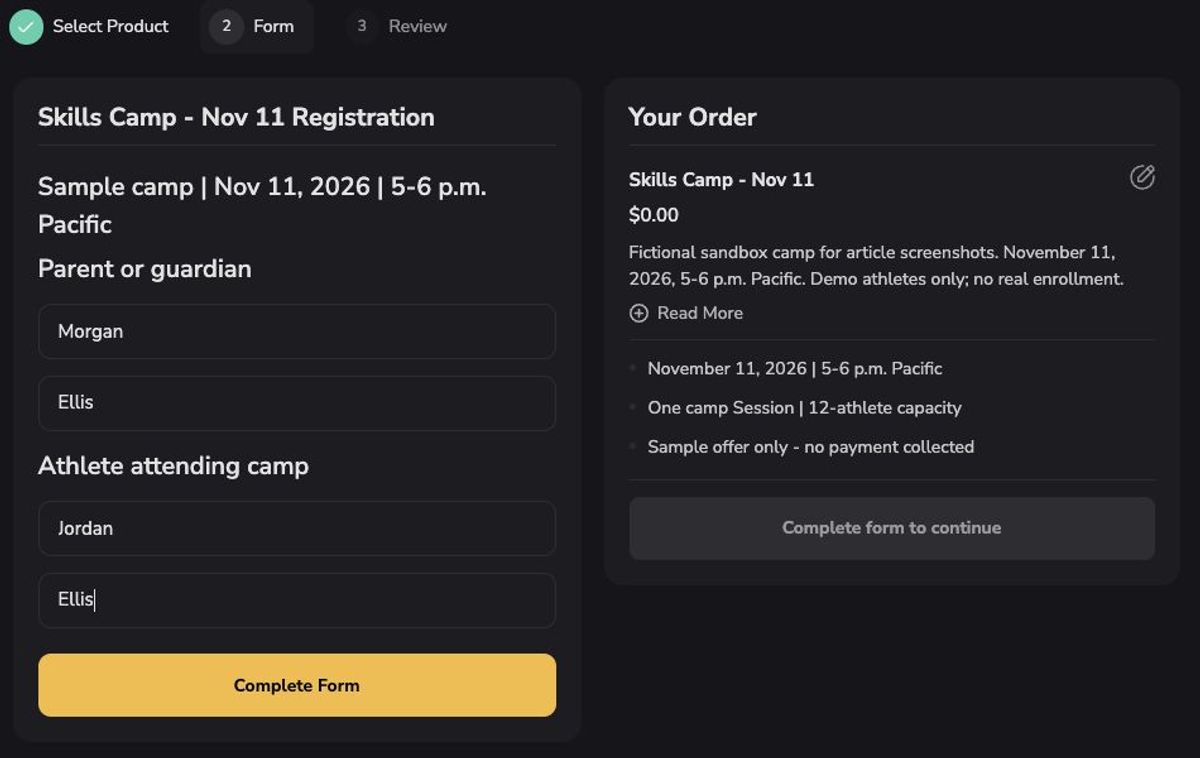
Sandbox example with fictional names: review the camp dates, parent and athlete details, and order summary together. This sample offer is $0; the form was not submitted and no payment was collected.
Check enrollment and Session capacity separately
A camp’s enrollment limit answers how many athletes you can accept overall. A Session limit answers how many athletes can attend one occurrence. If families can buy several days or choose among groups, write down both limits.
CoachIQ’s Scheduler settings include a maximum number of athletes per time slot. Leaving that capacity control unchecked allows unlimited capacity. The setting applies to that Scheduler; it is not a substitute for checking the camp’s complete enrollment process. Booking rules and limits.
Before launch, ask someone to demonstrate what happens when the final place is taken. Check the registration page, purchase result, and roster. Include staff-added athletes and any alternative purchase links in that review.
A hypothetical ten-week program
Imagine a facility offering ten weekly training Sessions for the same twelve athletes, with one upfront payment. These are example planning assumptions, not recommended group sizes or a verified CoachIQ configuration.
| Planning choice | Proposed approach | Evidence to check before opening registration |
|---|---|---|
| What the family buys | All ten listed dates, paid upfront | Checkout describes the complete offer and shows the intended total. |
| Who attends | Twelve named athletes | Each registration belongs to the intended athlete; enrollment does not exceed the plan. |
| Calendar | Staff reserve each athlete’s weekly dates | First, middle, and last dates have the correct roster and time. |
| Exceptions | Closures and make-ups agreed in advance | The date list and calendar agree. |
| Payment handling | Confirm the purchase separately from bookings | Staff can trace the payment without charging the family again while booking. |
| Attendance | Staff record arrival on each date | The attendance record belongs to that athlete and occurrence. |
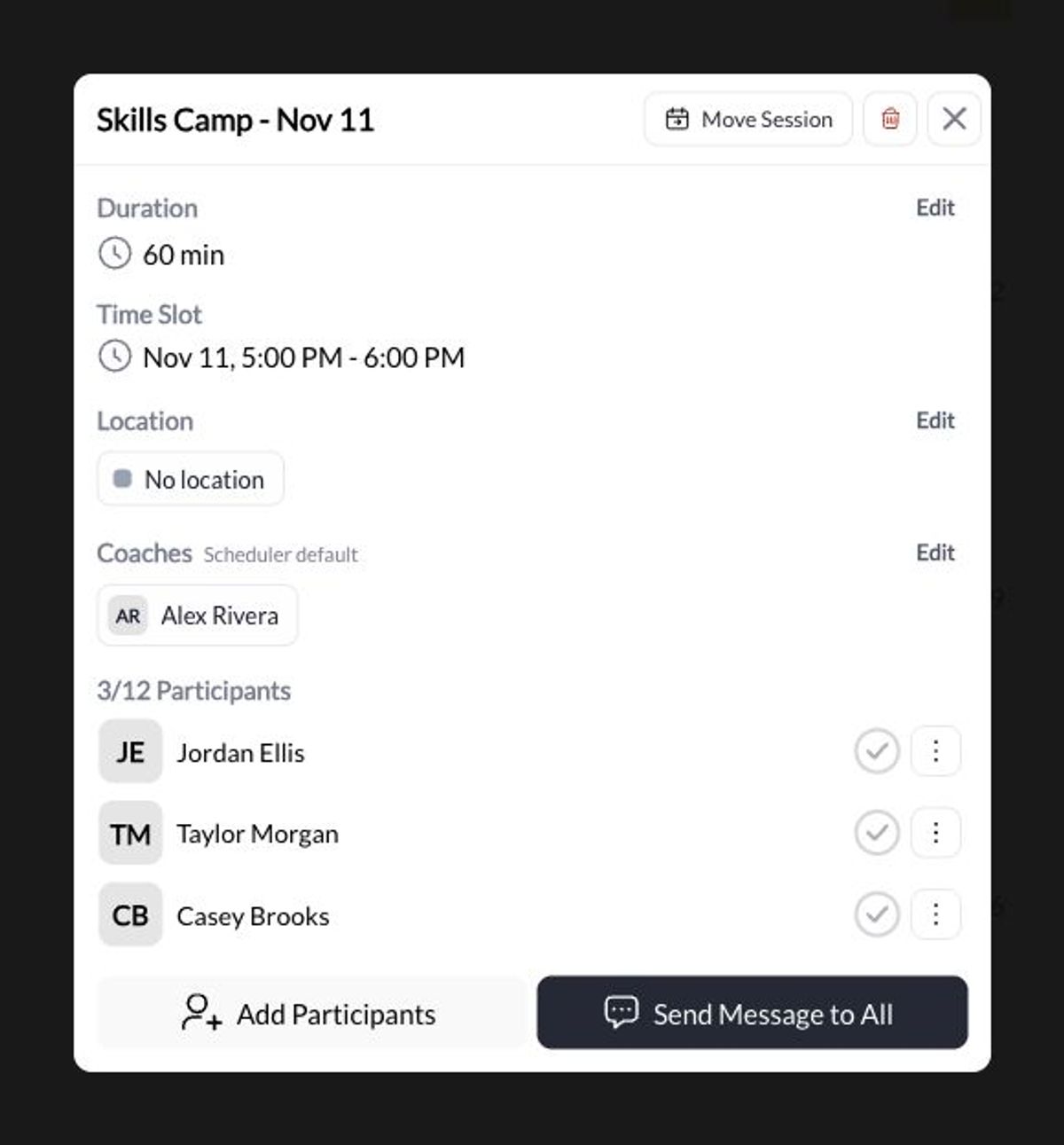
One sample camp date in the About sandbox, with three fictional athletes added by staff and attendance unchecked. This illustrates the roster view; it does not demonstrate automatic enrollment from checkout or the complete ten-week program.
CoachIQ documents staff-created recurring bookings with an end date and an occurrence preview. Athletes normally choose individual Sessions in their booking flow. Staff must review conflicts and saved results, especially when booking several athletes. Recurring bookings reserve time; they are separate from subscription billing. Recurring bookings.
If the offer uses Credits, verify which athlete owns them, which Scheduler accepts them, when they expire, and how staff booking redeems them. Do not assume the parent’s balance automatically applies to a child’s recurring booking. Connecting products to Schedulers.
Make cancellation rules clear before checkout
Tell families how to request cancellation, what happens after the deadline, and how you handle a canceled camp date. Keep those written terms consistent with your settings and staff process.
In CoachIQ, canceling one athlete’s booking, canceling a whole Session, and skipping one date in a recurring series are different actions. Credit returns and card refunds also need separate checks. Removing a booking is not proof that money was returned. Cancel bookings and Sessions.
Have staff practice the intended exception process before registration opens: one athlete withdraws, one date changes, or the facility cancels a Session. Confirm who remains booked and what the family sees afterward.
Use attendance as its own record
CoachIQ documents staff check-in from the calendar, including a selected occurrence of a recurring booking. Check-in records attendance; it does not charge a card or deduct Credits. A blank check-in means arrival has not been recorded, not necessarily that the athlete missed the Session. Checking in athletes.
Assign someone to check the roster on each date and resolve missing entries with the coach.
Your prelaunch checklist
Use this checklist with the person setting up registration. Record the result and who checked it.
- The public offer lists the right dates, location, age group, price, and included Sessions.
- A parent can identify the athlete being registered.
- Required information and the intended payment appear in the registration flow.
- Staff can distinguish a submitted form, a completed purchase, and a confirmed booking.
- The last available place behaves as intended across the purchase and booking paths.
- A fixed-term program has the right first and last dates, with closures accounted for.
- Cancellation, credit-return, and payment-refund responsibilities are clear.
- Attendance is recorded against the correct athlete and date.
Use an approved test setup for payment and booking checks, and confirm how test records will be handled before running them.
Bring your actual camp dates, group sizes, and payment plan to a free CoachIQ demo. Walk through the registration and calendar results your facility needs before opening enrollment.
