How to Track Athlete Progress: A Practical System for Coaches and Training Facilities
Guide

How to Track Athlete Progress: A Practical System for Coaches and Training Facilities

Track athlete progress with benchmarks, coaching notes, video, and athlete profiles. See a practical facility workflow and how CoachIQ connects each step.

By CoachIQ June 16, 2026

Last updated: July 30, 2026

Quick answer: The best way to track athlete progress is to combine repeatable benchmarks, short coaching notes, and video evidence on a fixed review cadence. At a coach-led facility, every coach should use the same definitions and record the work against a shared athlete record. CoachIQ connects that workflow through athlete profiles, custom fields, booking history, Programs, Video Analysis, Inbox, and the Athlete Portal.

Most coaches know when an athlete is improving. They see the quicker first step, cleaner release, or better decision under pressure. The problem is that the evidence often lives in one coach's head.

That becomes a business problem when another coach takes the session, a parent asks what has changed, or a membership comes up for renewal. A useful progress system makes development visible without turning every session into paperwork.

What is the best way to track athlete progress?

Use one repeatable loop:

  1. Choose three to five benchmarks. Pick the few measures that matter for the athlete's sport, age, and training goal.
  2. Record a baseline. Use the same test, setup, equipment, and scoring method every time.
  3. Add a short note after each session. Capture what changed, what still breaks down, and what the athlete should work on next.
  4. Save video checkpoints. Keep clips from comparable angles so the athlete can see technical changes.
  5. Review and re-test on a schedule. Start with every four to six weeks, then adjust the cadence to the length and intensity of the program.

The tool matters less than the consistency. If every coach records different metrics in a different place, the facility does not have a progress system. It has scattered observations.

If the facility is also comparing platforms, use the best sports coaching software guide to test which products keep athlete development connected to scheduling, payments, Programs, and communication.

How CoachIQ connects the progress-tracking workflow

CoachIQ gives a facility one connected place for the operational and coaching context around each athlete. It does not force every sport into the same testing template. Your staff decides what progress means, then uses the relevant part of CoachIQ to capture and deliver it.

What you need to track Where it fits in CoachIQ Why it matters
Athlete details and benchmark fields Athlete profile and custom fields Staff use the same labels and can find the athlete's current information without opening another contact database
Sessions, attendance, credits, and communication history People and athlete activity Coaches can review the training relationship before the next session
Program completion, form responses, and uploads Programs and Program Stats Staff can see what an athlete completed between live sessions
Annotated technique or game-film feedback Video Analysis Coaches can explain a correction with voiceover and visual markup
Progress recaps and next steps Inbox and Athlete Portal Athletes, parents, and guardians receive the work where they already manage training

For a facility running several coaches, that connection matters. The athlete record stays with the business, Programs preserve the assigned work, and feedback does not disappear into a personal camera roll or text thread.

Why athlete progress tracking matters to the facility

Progress tracking does three jobs at once.

It improves the coaching plan. A repeatable benchmark shows whether the current work is producing the intended change. If the number or movement is not improving, the coach has evidence to adjust the plan.

It gives the athlete a clear target. "Get quicker" is vague. "Cut 0.15 seconds from the same 10-yard split over the next six weeks" gives the athlete something they can understand and work toward.

It makes the training relationship visible. A short recap helps athletes, parents, and guardians see what changed and what comes next. That makes the renewal conversation more concrete than "trust me, they're getting better."

It also protects continuity. When progress only lives in one coach's memory, the athlete starts over every time the schedule changes. Shared definitions and records let another authorized coach pick up the plan without guessing.

What should a facility measure?

Start with three evidence types. Add more only when the extra information will change how you coach.

1. Objective performance benchmarks

These are repeatable tests with a number attached. Examples include:

  • Speed and power: 10-yard split, vertical jump, broad jump, or medicine-ball throw
  • Sport skill: serve speed, exit velocity, shooting percentage from defined spots, or time through a fixed ball-handling course
  • Conditioning: shuttle time, repeat-sprint consistency, or recovery heart rate

Define the protocol before recording the number. "Vertical jump" is not consistent if one coach uses a jump mat and another estimates against a wall. Record the test, equipment, conditions, and units so the next result is comparable.

2. Coaching observations

Numbers do not capture decision-making, confidence, footwork quality, or how an athlete responds under pressure. A useful session note can be one or two lines:

Maintained lower stance in closed drills. Still stands up when reacting to a live first step. Next session: add the same cue in a two-read drill.

That note says what changed and what comes next. "Good session" does neither.

Use custom fields and athlete activity for stable information, and booking or activity notes for session context. Keep the language consistent across coaches so the record is easy to scan.

3. Video evidence

Video shows changes that a number or note can miss. Record from the same angle when possible, label the date and training focus, and compare only clips captured under similar conditions.

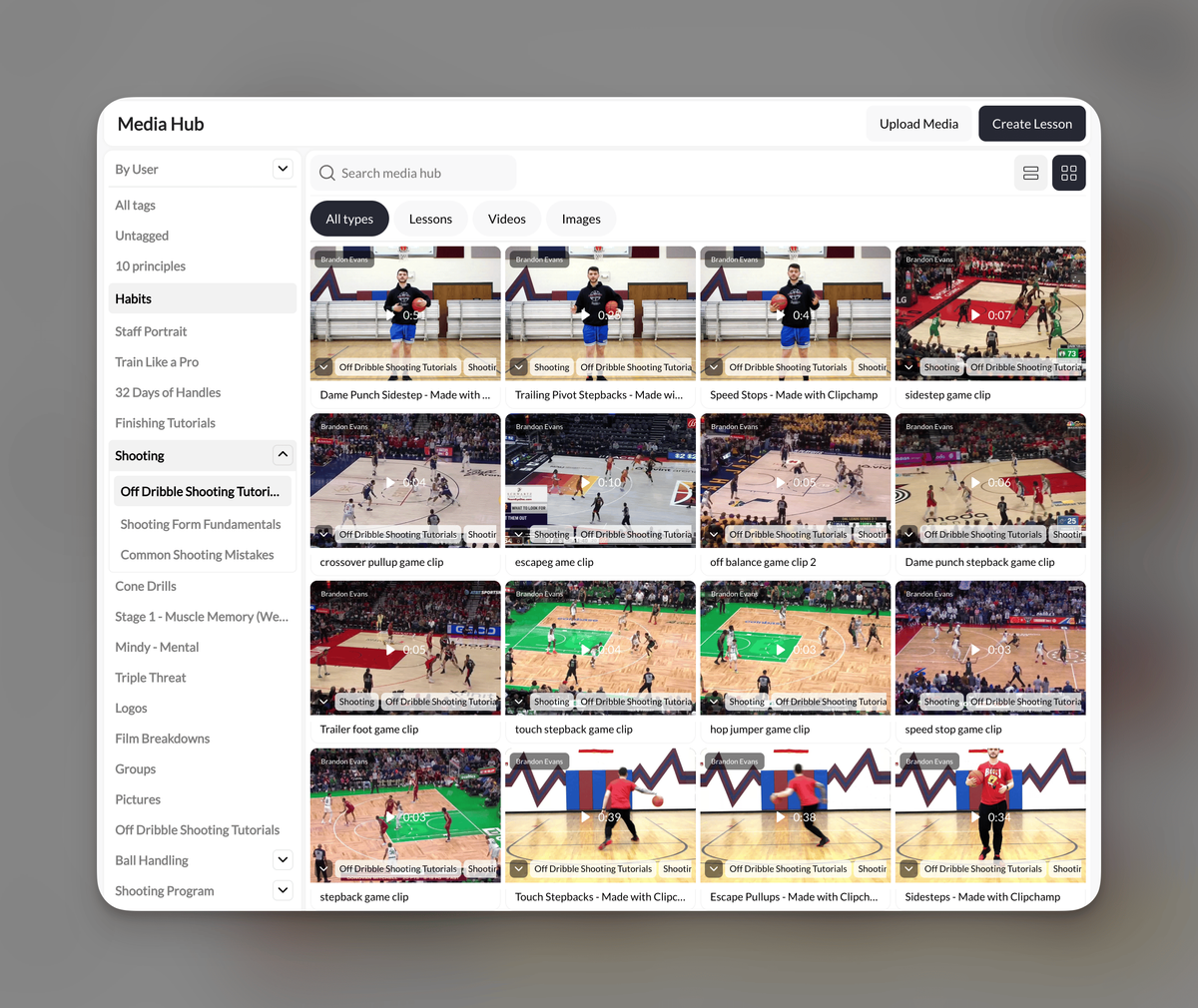
CoachIQ's Video Analysis lets a coach add voice commentary, drawings, and visual markup to an athlete's footage. The finished analysis can be saved in the Media Hub and delivered through a Program or direct message.

Keep each review focused. Two or three clear corrections are easier for an athlete to use than a 15-minute breakdown of everything that went wrong.

How to set up athlete progress tracking across several coaches

The challenge at a facility is not choosing a metric. It is getting five coaches to record it the same way.

Create one scorecard per program

Choose the benchmarks that define progress for that program. A baseball hitting program might track exit velocity, hard-hit percentage in a fixed round, and one bat-path observation. A basketball development program might use a timed movement test, shooting percentage from five defined spots, and one decision-making cue.

Write down:

  • The benchmark name
  • The testing method
  • The unit
  • The starting value
  • The target
  • The re-test date
  • The coach responsible

Keep the post-session note short

Give coaches a simple pattern:

Changed: What improved today
Needs work: What still breaks down
Next: What the next session should address

If the note takes more than a minute or two, it will not survive a busy evening schedule.

Assign one person to audit the records

Once a week, a lead coach or facility manager should check that notes are being added and benchmark names stay consistent. This is not a deep performance review. It is a five-minute quality check that prevents the system from drifting.

Turn the data into a progress report

Data the athlete never sees cannot help them understand their development. Send a short recap monthly or at the end of a training block.

A practical progress report includes:

  • Starting point: Two or three baseline values
  • Current result: The same tests under the same conditions
  • Coach's read: One paragraph explaining what changed
  • Video evidence: One or two comparable clips
  • Next block: The focus for the next four to six weeks
  • Next test date: When the athlete will measure again

Here is a simple template:

This block's focus: First-step acceleration
Baseline: 10-yard split — [value] on [date]
Current: 10-yard split — [value] on [date]
What changed: [One or two sentences]
Next focus: [One clear coaching priority]
Re-test: [Date]

Send the recap through the same place the athlete or parent uses for training communication. CoachIQ's Inbox keeps the conversation with the business, while the Athlete Portal gives families one place for messages, Programs, Sessions, and account information.

For the broader communication setup, see the guide to coach-athlete communication.

What to look for in athlete progress tracking software

Use this checklist when comparing tools:

Capability Question to ask
Shared athlete record Can every authorized coach see the same history and current information?
Flexible data capture Can the facility define its own fields, forms, and notes?
Session context Are Bookings, attendance, and coaching notes connected to the athlete?
Program tracking Can staff see completion, responses, and athlete uploads?
Video feedback Can coaches annotate footage and deliver it without a separate text thread?
Athlete-facing delivery Can athletes, parents, and guardians find the recap later?
Export and ownership Can the facility keep its records if its process or software changes?

A spreadsheet can hold benchmark numbers. A video app can hold clips. A messaging app can send the recap. The hard part is keeping the athlete, session, Program, feedback, and next step connected as the facility adds coaches.

CoachIQ is built for that connected coach-athlete workflow. It brings athlete management, Sessions, Programs, messaging, and video feedback into the same operating system used to run the facility.

Frequently asked questions

How often should coaches test athlete benchmarks?

Every four to six weeks is a useful starting point for many development programs. Test often enough to adjust the plan, but not so often that normal day-to-day variation looks like a meaningful change. Match the final cadence to the athlete's age, sport, training phase, and benchmark.

What is the best way to track progress across a whole facility?

Use a shared athlete record, one scorecard per program, and the same note format across coaches. Define each benchmark's test method and unit before the first assessment. Assign a lead coach to check consistency each week.

Can a facility start with a spreadsheet?

Yes. A spreadsheet is enough for a small pilot if every coach uses the same fields and testing method. It becomes harder to manage when Bookings, notes, video, Programs, and communication live in separate tools.

What athlete progress can CoachIQ track?

CoachIQ can store athlete custom fields, booking and activity history, session context, Program completion and responses, media uploads, and annotated video feedback. Facilities choose their sport-specific benchmarks rather than working from one fixed testing template.

Can athletes and parents see progress in CoachIQ?

Coaches can deliver progress recaps, Programs, and video feedback through CoachIQ's Inbox and Athlete Portal. The facility controls what it shares and which staff members can access the underlying athlete record.

Make progress visible without adding hours of admin

A useful athlete progress system is small enough that coaches will keep using it. Choose three to five benchmarks. Add one short note after each Session. Save comparable video. Re-test on schedule. Then send the athlete a recap they can understand.

CoachIQ connects those pieces to the same athlete, Programs, communication, and facility workflow used by 750+ coaches and training facilities. Book a free demo to see how CoachIQ can support the progress system your staff already wants to run.

POWERED BY

CoachIQ Logo