Before you replace Acuity, name the part of your training week that needs to work differently. Is it reserving a coach and a cage together? Keeping two siblings' bookings straight? Selling a program that reserves every date?
Four Acuity alternatives worth evaluating for sports coaching facilities are CoachIQ, Upper Hand, Swift, and EZFacility. Start with your hardest recurring task and ask each vendor to demonstrate it. Acuity may already meet the need: it supports group classes, subscriptions on eligible plans, and shared-resource limits.
This guide explains what the documentation establishes, what to check in a demo, and how to plan a switch without losing track of bookings or balances.
CoachIQ publishes this comparison and is one of the options. We reviewed official product documentation on November 2, 2026. This is a documented-feature comparison, not an independent hands-on test or a ranked list of winners. Demo outcomes below remain unverified until you run the tests.
When staying with Acuity makes sense
If families can book the right sessions, staff can manage availability, and you can reconcile payments without recurring confusion, a new system needs to demonstrate a meaningful improvement.
Check your current setup before treating a missing setting as a missing feature:
- Memberships and packages: Acuity lists these on Standard and Premium. Its subscription setup supports recurring charges through Stripe or Square, with rules for redeeming the subscription's value. PayPal does not support Acuity subscriptions. Plan details and subscription setup.
- Classes and fixed terms: Acuity supports participant limits, recurring class offerings, and series that require enrollment in every date for one total price. After a series begins, late enrollment requires manual addition. A ten-week program alone is not a reason to switch. Classes and series.
- Shared spaces: Acuity resources limit concurrent bookings across calendars. Resources are hidden from clients and do not work across calendars in different time zones. If a client must choose a particular room, Acuity directs you to separate calendars. Resource controls.
A practical next step is to write down three recent situations that needed staff intervention. Separate setup problems from workflows the software cannot demonstrate. Take that list to Acuity support and to alternative vendors.
Compare the workflow before the feature list
The same word can describe different behavior. A membership might provide discounts, booking credits, access, or some combination. A recurring booking does not necessarily mean a family can buy a whole term in one checkout.
Use this shortlist to choose demos. The capabilities are vendor-documented; the questions are evaluation criteria, not claims that a product lacks a feature.
| Option | Documented starting point | What to demonstrate with your setup |
|---|---|---|
| Acuity | Classes, eligible-plan memberships, calendar and resource controls | Can your existing configuration handle the actual problem? |
| CoachIQ | Coaching sessions, Credits, coach availability, and attached resources | Booking eligibility, parent/athlete flow, cancellation outcomes, and your recurring-program setup |
| Upper Hand | Sports scheduling, registration, resources, and memberships | A coached session and a rental using the same space, plus included plan features |
| Swift | Membership discounts and credits, with service-specific booking rules | How your lessons, classes, rentals, and membership billing behave together |
| EZFacility | Facility scheduling, membership management, registrations, and payments | How a resource reservation connects to athlete enrollment, attendance, and reporting |
The sections below link to the supporting sources. If you are comparing a wider range of systems, our sports facility management software guide covers that broader decision.
CoachIQ: evaluate the coach-to-athlete booking workflow
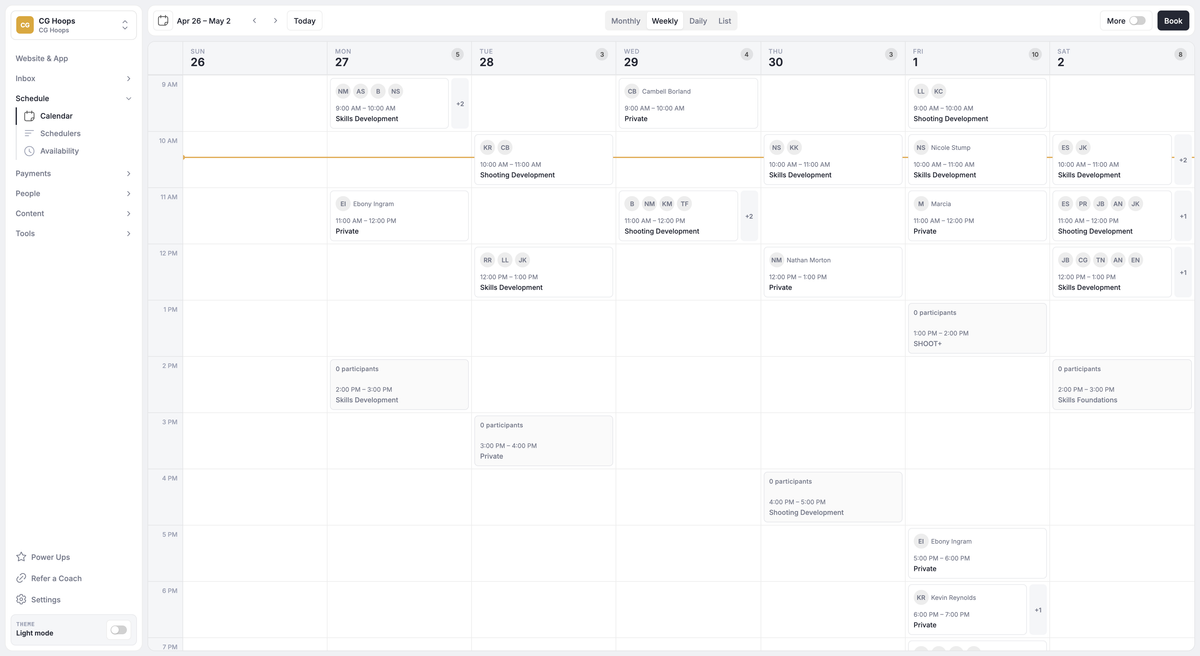
Example CoachIQ scheduling view. Use a demo to check your own coaches, sessions, and shared-space requirements.
Documented strengths. CoachIQ describes schedulers with session capacity, assigned coaches, and payment choices. Athletes can use Credits from eligible packages or subscriptions. Its payments documentation also describes subscriptions that optionally issue Credits each billing cycle. Scheduling and payments.
For shared spaces, CoachIQ documents reserving all attached resources or assigning an available resource from a pool. Keep resource double booking off when a space must be exclusive. Athletes do not choose the assigned cage or court; staff see the assignment. Resource setup.
Check in your demo. Bring a real membership offer and cancellation policy. Ask the team to show the eligible sessions, the balance after booking, and the result of a cancellation. Returning a Credit and refunding a card payment are separate actions. Demonstrate the parent booking separately for each athlete; do not assume siblings share balances. Cancellation documentation.
Two qualifications matter if they are part of your current routine: recurring bookings are coach-initiated rather than athlete self-served, and Google Calendar sync is one-way. Google events do not block CoachIQ availability, and Google edits do not update CoachIQ bookings. Scheduling details and Google Calendar sync.
Cost and migration. Subscription pricing: Varies. Review the pricing page and request the full quote, including payment fees and onboarding scope. Get written confirmation of which Acuity records and opening balances the team can import.
Who should evaluate it? Coaches and the facilities they run whose decision centers on connecting session booking, athlete eligibility, and payments. Use the same tests whether you operate one location or several. Our credit-based booking guide helps define the offer before the demo.
Upper Hand: evaluate coaching programs alongside resource operations
Documented strengths. Upper Hand describes sports scheduling and registration with staff and resource management. Its membership product includes recurring memberships, program credits, and discounts. That gives you a basis for reviewing both coached programs and facility-resource work. Scheduling and registration and membership management.
Check in your demo. Ask for a lesson and a rental that compete for the same space. Then change the coach, cancel one booking, and inspect the remaining availability and membership benefits. Compare who performs each step and which permissions they need. A resource-management feature label does not establish your exact outcome.
Cost and migration. Upper Hand lists Start at $79 and Grow at $199 per month, both paid annually; Scale requires a quote. Facility and resource management is listed under Grow. Optional enhancements can change the total. Confirm the plan used in your demo and the Acuity import scope in writing. Current pricing.
Who should evaluate it? Facilities comparing rental/resource operations with their coach-to-athlete workflow. Make that distinction through actual tasks rather than using facility size as a shortcut.
Swift: evaluate membership rules across lessons and rentals
Documented strengths. Swift documents recurring memberships that can supply discounts or service credits. It distinguishes Swift Billing from older Stripe Billing setups; Stripe remains the payment processor under Swift Billing. Rental credits use the configured minimum duration, while each class or lesson session uses one credit. Membership documentation.
Check in your demo. Test the same membership against a lesson, a class, and a rental. Swift's pricing guide says lessons and classes can be credit-only, while rentals and camps must have prices. Confirm how that rule affects the offers you sell. Also confirm which billing setup applies to your account before relying on instructions for changes or cancellations. Service-pricing rules.
Cost and migration. Request a current subscription quote, payment-fee schedule, and onboarding/import scope. We have not verified a current public subscription price for this comparison. Ask how imported memberships and unused sessions or credits would be represented under your billing setup.
Who should evaluate it? Facilities whose decision depends on the relationship between lessons, rentals, member discounts, and credits. Have the vendor demonstrate the specific mix you sell.
EZFacility: evaluate facility reservations through enrollment and billing
Documented strengths. EZFacility lists facility scheduling, league management, memberships, package sales and attendance, a self-service portal, and payment tools. Those categories make it a relevant option when resource reservations and other facility operations are central to your comparison. EZFacility product overview.
Check in your demo. Start with a court or cage reservation, then enroll athletes in a coached group using that space. Inspect family registration, attendance, cancellation handling, and reporting. Ask staff to complete the process under their own permission levels. The question is how the rental/resource workflow connects to the coached program.
Cost and migration. EZFacility's pricing page asks you to submit a form for packages and prices. Request a written quote that identifies the features shown in the demo, onboarding, payment fees, and supported imports. Plans and pricing.
Who should evaluate it? Operators who want to compare facility-resource administration with athlete enrollment and billing in the same evaluation. Include your coached-session requirements even if the first demonstration focuses on rentals.

Build your demo around the coaching sessions and shared spaces you manage every week.
Use the same seven-task demo worksheet
Here is a hypothetical facility, not a customer case study: four coaches, two shared training spaces, an eight-athlete class, a ten-week program, and a parent booking for two athletes. Replace these inputs with your own before a demo.
Mark each task as a must-have or a preference first. Then use one copy of this worksheet for Acuity and each alternative. Do not award points for a promise to show something later.
| Task | Evidence to record | Result |
|---|---|---|
| 1. Book a coach and shared space, then try a conflicting booking. | Exact settings; whether the conflict is prevented; any staff workaround. | Unverified |
| 2. Renew a membership and use it to book an eligible session. | Billing date, allocation and expiry, eligible sessions, balance before and after. | Unverified |
| 3. Enroll in all ten program dates with an upfront payment. | All dates reserved, capacity enforcement, late enrollment and makeup process. | Unverified |
| 4. Have a parent book separately for two athletes. | Correct athlete on each roster, payment ownership, consent, individual or shared sessions or credits. | Unverified |
| 5. Cancel before and after the notice deadline. | Permission to cancel, sessions or credits returned, and money refunded as three distinct outcomes. | Unverified |
| 6. Change coach or location and inspect access. | Staff permissions, resource availability, rules for using sessions or credits, location reporting. | Unverified |
| 7. Import a small sanitized sample. | Accepted fields, rejected records, duplicates, future bookings, and reconciled opening balances. | Unverified |
For every row, record the date, plan, person performing it, and a screenshot or recording you are permitted to retain. Use Pass, Manual step, Unsupported, or Unverified. A pass means the demonstrated result meets the requirement you wrote down. A manual step may be acceptable; record who will own it each week.
Run billing and import exercises in an agreed test environment with synthetic records. You do not need to move real families or charge real cards to establish the steps.
Compare total cost on the same basis: subscription, billing commitment, payment fees, optional tools, setup/import work, and the staff tasks that remain. For context, Acuity's listed monthly USD prices are Starter $20, Standard $34, and Premium $69; annual-billing equivalents are $16, $27, and $55 per month, before applicable taxes. Starter includes one calendar, Standard up to six, and Premium up to 36; Enterprise is also available. Acuity pricing.
Plan the move before changing the booking link
Acuity documents CSV exports for clients and bookings. Selected intake-form responses can be included in a booking export, but selecting a form limits that export to bookings with that form attached. Check the date range and form filters before treating an export as complete. An export path does not establish that another system can import every field or transfer payment credentials and subscriptions. Acuity export instructions.
Use these steps before committing to a cutover:
- Inventory what must survive. List future bookings, active subscriptions, unused package balances, parent/athlete relationships, and forms or waivers you need to retain. Do not assume one CSV contains all of them.
- Get the destination's import scope in writing. Identify supported fields, unsupported records, manual work, fees, and who checks the result. Ask the vendors and processor whether payment credentials can transfer; do not promise families that they will.
- Reconcile a small sample. Compare record counts, dates and time zones, athlete identities, and opening balances. Resolve discrepancies before importing the rest.
- Map the billing cutover. Identify which system collects each next payment and when old recurring charges stop. Check for duplicate charges and missed renewals.
- Prepare staff and families. Explain where to book, whether sign-in or payment setup is needed, and what happens to existing bookings and balances. Give staff a clear route for exceptions.
- Retain a reference and recovery plan. Keep secure exports and access arrangements for the agreed transition period. Assign someone to compare the first bookings and billing cycle with the migration record.
Switch when the demonstrated improvement is worth the transition work. If the new system leaves your most difficult task unresolved, finish that evaluation before moving families.
Questions facility owners ask about Acuity alternatives
Can Acuity handle memberships and group programs?
Yes. Eligible plans support memberships and subscriptions, and its class tools support groups and series. Check the plan, payment processor, and enrollment rules described above before deciding you need another platform.
Does a ten-week program require a switch?
No. Acuity documents series enrollment across all dates for a total price. Test your capacity, late-entry, and makeup requirements. Other platforms should demonstrate the same complete program rather than only a repeating time slot.
Can I move packages and recurring billing automatically?
Do not assume so. A client or booking export does not prove that unused balances, card credentials, or active subscriptions transfer. Get the import plan and billing cutover confirmed before announcing the move.
How should a multi-location facility choose?
Add a second location to the demo. Test staff access, coach conflicts, resources, time zones, eligible sessions or credits, and location-level reporting. Distinguish a location label from the operational controls you need, and verify the required plan with every vendor.
Which Acuity alternative should I try first?
Start with the vendor whose documented workflow matches the task causing the most friction, then compare it with your current Acuity setup using the worksheet. For a broader shortlist, use the facility-software guide linked above.
If CoachIQ is on your shortlist, book a free demo. Bring a membership offer, your cancellation policy, and one booking that is difficult to manage today. Ask us to show the full process, including the exceptions.
