Evaluate CoachIQ for hockey facilities built around coaching, lesson Credits, clinics, and recurring athlete development. Compare Dash and EZFacility for rink operations, RecTimes for ice bookings and rental agreements, and Upper Hand for training programs and resource management.
Your shortlist should reflect what you operate: an ice rink, a hockey training center, an off-ice development facility, or a combination. A team ice rental, an individual lesson, and a shooting-lane booking reserve different resources and involve different payment rules.
Start with the work your staff repeats. Can the proposed system protect resurfacing time, coordinate the coach across ice and off-ice spaces, and show which athlete or team owes what after a change?
CoachIQ publishes this comparison and is one of the products. We reviewed public vendor documentation on October 26, 2026. We have not configured and tested every system. The recommendations reflect documented workflows; the demo tests below are proposed acceptance checks, not verified product results.
Five hockey facility software options to evaluate
Swipe sideways to compare all columns →
| Platform | Workflow to evaluate | Pricing context | What to demonstrate |
|---|---|---|---|
| CoachIQ | Training purchases, Sessions, Credits, athlete communication | Varies; monthly subscription, no annual contract | A coach moving between ice and off-ice training |
| Dash | Ice-facility scheduling, family booking, rink integrations | Request a quote | Your rink schedule and required participant checks |
| EZFacility | Partial surfaces, rentals, equipment, POS, coaching | Request pricing | Whole/partial ice conflicts and rental billing |
| RecTimes | Ice bookings, repeating rentals, invoices, agreements | Request pricing; pricing page restricted | One changed date in a season rental agreement |
| Upper Hand | Programs, coaches, memberships, facility resources | Grow: $199/month paid annually; verify extras | A clinic requiring both a coach and a space |
This is a workflow shortlist, not a universal ranking. Use the same schedule, products, and cancellation scenario in every demo. Compare the configuration the vendor will actually deliver.
CoachIQ: connect training purchases, athletes, and coaches
CoachIQ connects Scheduling, Payments & Billing, athlete records, and communication. A hockey facility can evaluate the path from a purchased lesson pack to a booked Session, attendance, and the next training visit.
Demo test: A family purchases goalie-training Credits for one athlete and registers a sibling for an off-ice clinic. Book the correct athlete into each offering. Inspect coach availability, roster capacity, purchase eligibility, and the remaining Credit balance. Cancel only one booking and check the other athlete's registration separately.
If coaches teach on the ice and in a shooting area, test their availability across both locations. If you rent ice from another operator, establish which system owns that ice reservation and how staff confirms it before opening training bookings.
This review does not establish native rink-control integrations, automatic resurfacing scheduling, or linked whole/partial-sheet inventory in CoachIQ. Bring those requirements to the walkthrough and ask to see the proposed setup and any manual steps.
Pricing: Varies. See CoachIQ pricing. Monthly subscription, no annual contract.
Dash: evaluate the rink's operating workflow
Dash's ice-facility offering describes family booking and staff permissions, and lists integrations including USA Hockey membership validation, Learn to Skate, SportNinja, and LiveBarn. Confirm the scope, configuration, and charges for any integration you require.
Demo test: Build a week containing hockey training, team rentals, and another skating program. Add the rink's maintenance blocks, then move one session. Inspect public availability, family notifications, and the participant-check workflow you actually need. Ask what happens if an external validation service is unavailable.
Pricing: Request an itemized quote. We did not verify a public dollar rate on the pages reviewed. Include implementation, payment processing, support, and integration costs. The reason to evaluate Dash is the rink workflow, not a facility-size threshold.
EZFacility: partial surfaces, rentals, and facility services
EZFacility's rink page documents single, multiple, and partial skating surfaces, public skate scheduling, equipment rentals, POS, coaching availability, and invoicing. These cover several distinct revenue sources within a rink.
Demo test: Reserve a permitted partial surface, then attempt a whole-sheet rental over it. Reverse the sequence. Next, add a skate-rental or equipment charge to a booking and inspect the invoice and inventory record. A vendor's partial-surface feature still needs to demonstrate your exact dependency rules.
Pricing: The plans and pricing page directs visitors to a form. Request a quote for the actual modules and workflows you need; no public dollar rate is verified here.
RecTimes: ice bookings and season rental administration
RecTimes lists repeating bookings, overlap checks, multi-venue scheduling, individual rates, booking-linked invoices, and online agreements. Its documentation also describes deposits and monthly payment breakdowns.
Demo test: Create a team's weekly ice rental for a season. Change one date, inspect the invoice and agreement, and identify how the change is communicated. Then cancel one occurrence and reconcile the amount owed against the remaining schedule. Ask which records update automatically and which need approval.
Pricing: Request current pricing. Its pricing URL required restricted access when reviewed, so we have not published a rate. Confirm the charges and limits for your venues, payment services, and agreement workflow.
Upper Hand: hockey programs and resource management
Upper Hand's hockey offering presents sports registration and training operations. Its pricing page places facility/resource management, retail, and staff/payroll tools in Grow.
Demo test: Schedule a skills clinic with a required coach and space. Attempt a conflicting off-ice booking for that coach, then change the clinic time. Inspect resource availability, registrations, and purchase rules. Test resurfacing blocks separately; a general scheduling feature does not establish a specific rink-maintenance workflow.
Pricing: Grow is listed at $199/month, paid annually. Start is $79/month paid annually, while facility/resource management is listed under Grow. Confirm processing, onboarding, and optional enhancements in the quote.
Run the ice-and-coach conflict test
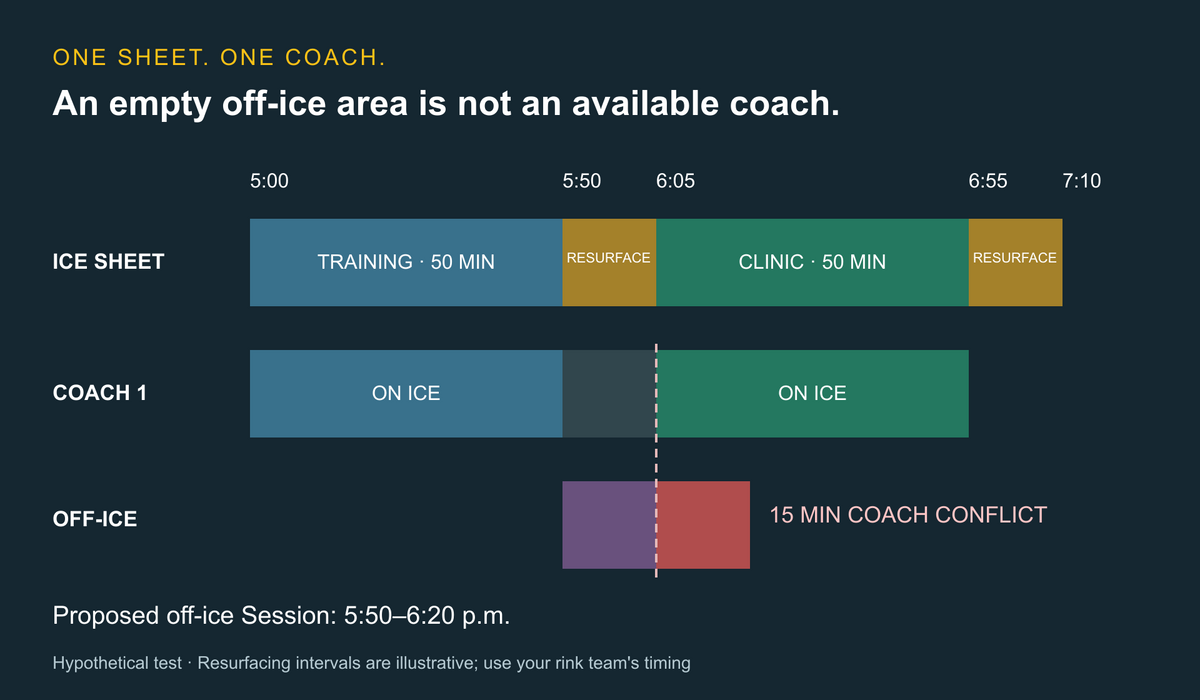
Use this hypothetical schedule with one ice sheet, one off-ice training area, and one coach. The 15-minute resurfacing blocks are illustrative operator-selected intervals, not a recommendation or industry standard. Use the timing established by your own rink team.
Swipe sideways to compare all columns →
| Time | Ice sheet | Coach 1 |
|---|---|---|
| 5–5:50 p.m. | Private training block | Teaching on ice |
| 5:50–6:05 p.m. | Resurfacing; unavailable for booking | Transition or other assigned work |
| 6:05–6:55 p.m. | Skills clinic | Teaching on ice |
| 6:55–7:10 p.m. | Resurfacing; unavailable for booking | Transition or other assigned work |
The 130-minute window contains 100 minutes of booked activity and 30 minutes of resurfacing. It has no unallocated ice time. Reporting that counts only athlete-facing activity should not make those 30 minutes look available for another booking.
Now attempt a 5:50–6:20 p.m. off-ice Session with Coach 1. Even if the off-ice area is empty, the last 15 minutes conflict with the coach's 6:05 clinic. Your staff must resolve that conflict—such as by changing the time or assigning a suitable available coach—before confirming the Session. Account for your own transition requirements as well.
Six checks to record in each demo
- Protect the maintenance block. Attempt an ice booking at 5:55 p.m. Check staff entry and public self-booking separately. Record whether the block prevents booking, warns, or relies on a manual procedure.
- Detect the coach conflict. Attempt the 5:50–6:20 off-ice Session. An empty space must not be treated as proof that Coach 1 is available.
- Handle a delay. Assume the ice cannot reopen until 6:20. Keeping the clinic's 50-minute duration moves its end to 7:10, and the following 15-minute block ends at 7:25. If the next commitment starts at 7:10, the revised plan conflicts. Identify who resolves it before sending a new time to families.
- Separate capacity from ice time. Add an athlete to a clinic with available places. Then attempt a separate overlapping ice rental. Filling a clinic place does not create another ice reservation.
- Reconcile a cancellation. Cancel one athlete's clinic registration. Inspect the purchase balance and roster without assuming the entire clinic's ice reservation should disappear.
- Change one recurring date. Move a single occurrence and confirm that other dates, balances, agreements, and notifications match the intended change.
These are tests to demonstrate, not claims that every platform handles them automatically. Save the outcome, required plan, and manual steps alongside each quote. Our facility scheduling guide provides broader checks for coaches and shared resources.
Decide which record owns the ice
If your facility owns the rink, ask how training bookings, team rentals, public sessions, and maintenance appear in one operating view. If your training business leases ice elsewhere, separate the confirmed rink allocation from the athlete's lesson booking.
Write down which system controls each resource and who handles a cancellation. A coaching calendar and a rink rental calendar can disagree even when both display the same event name. Do not assume an integration exists or that a calendar subscription provides two-way conflict protection.
For off-ice-only facilities, replace the ice sheet in the exercise with the appropriate shooting lane, synthetic-ice area, or training space. Keep coach availability, capacity, equipment requirements, and reset policies explicit. You do not need to buy a rink workflow simply because you train hockey athletes.
Compare quotes using the same operating plan
Swipe sideways to compare all columns →
| Cost or requirement | Ask for a written answer |
|---|---|
| Subscription | Included locations, staff accounts, modules, billing term, and renewal terms |
| Ice inventory | Whole/partial surfaces, maintenance blocks, recurring allocations, and overrides |
| Training | Lesson Credits, clinics, family accounts, and coach availability across spaces |
| Rental billing | Deposits, installments, agreement changes, cancellations, and refunds |
| Payments | Processing percentage, fixed charges, platform fees, and hardware |
| Rink services | Participant validation, POS, equipment rental, scoring, and other integrations |
| Implementation | Data migration, staff training, support, and time to configure your actual rules |
Keep software costs separate from your ice rental or rink operating costs. Ask vendors to price the same activity mix and required integrations. Our sports facility management software comparison includes a broader vendor scorecard.
Rehearse the migration before moving the season
Use a small sample: a family with two athletes, an unused lesson pack, a team rental with a deposit, a clinic roster, and one recurring booking with an exception. Compare the old and new schedules date by date, including maintenance and closure blocks.
Confirm what transfers and what staff must rebuild. Ask payment providers about saved-card portability. A contact export should not be treated as proof that future billing will continue correctly.
Before opening bookings, agree which calendar is authoritative for each space. Test one changed Session through the roster, coach schedule, purchase balance, and family notification. Preserve the previous records for reconciliation.
Questions hockey facility owners ask
Is hockey team software the same as facility software?
Evaluate the work separately. Rosters, game schedules, and messages do not by themselves demonstrate ice inventory, rental invoicing, lesson purchase eligibility, or maintenance blocks. Bring those requirements to the demo.
Does facility software control the ice plant or resurfacer?
Do not assume so. This comparison concerns business scheduling and administration. Ask about any required equipment integration explicitly; none is established for CoachIQ by this review.
Which platform should a coach-led hockey facility evaluate first?
Evaluate CoachIQ around the connection between training purchases, athletes, coaches, and Sessions. Compare the same requirements with rink and facility platforms. Choose from demonstrated workflows, including the on-ice/off-ice conflict test, rather than a sport label alone.
