Start with CoachIQ when your lacrosse facility runs on coaching, lesson Credits, clinics, and recurring athlete development. Compare Upper Hand for programs and resource management, EZFacility for rentals and league administration, Swift for online lessons and rental booking, and Dash for season-based facility scheduling.
The deciding question is what your facility sells. A shooting clinic sells athlete places. A team rental sells exclusive turf time. A private Session needs both a coach and an appropriate space. Software needs to keep those commitments aligned when a booking changes.
This guide is for owners running lacrosse training facilities, indoor turf, and mixed-sport spaces. Bring your actual floor plan, coaching schedule, and payment rules to the demonstrations below.
CoachIQ publishes this comparison and is one of the products. We reviewed public vendor documentation on October 26, 2026. We have not configured and tested every platform. The shortlist reflects documented workflows; the demo exercises are acceptance tests, not verified product results.
Five lacrosse facility software options to compare
Swipe sideways to compare all columns →
| Platform | Workflow to evaluate | Pricing context | Lacrosse demo priority |
|---|---|---|---|
| CoachIQ | Coaching, Credits, memberships, athlete communication | Varies; monthly subscription, no annual contract | Keep the athlete's purchase, coach, and training space connected |
| Upper Hand | Programs, staff, and facility resources | Grow: $199/month paid annually; verify extras | Reserve the turf and required coach for one clinic |
| EZFacility | Rentals, deposits, leagues, and facility scheduling | Request pricing | Block overlapping whole-field and half-field rentals |
| Swift | Online lessons, rentals, packages, and memberships | Request current pricing; no rate verified here | Distinguish a lesson purchase from rental time |
| Dash | Seasons, classes, facility rentals, and leagues | Request pricing | Reschedule one date in a recurring program |
These products overlap. Compare the same work in each quoted plan instead of treating a feature label as proof that your particular rules are supported.
CoachIQ: connect the training purchase to the athlete's next Session
CoachIQ connects Scheduling, Payments & Billing, athlete records, and communication. For a lacrosse facility, the evaluation should follow an athlete from a purchased lesson pack into a booked Session and subsequent training visits.
Bring this demo: A family purchases private-training Credits for one athlete and registers a sibling for a group clinic. Book each athlete into the intended offering. Inspect the roster, coach availability, purchase eligibility, and remaining Credit balance. Then cancel only the private Session and check each outcome separately.
Add position-specific training to the walkthrough: a goalie Session may need a particular coach and reserved area; a stick-skills clinic may have a different roster limit. Demonstrate your actual setup rather than assuming every offering uses the same rules.
For subdivided turf, use the whole-field conflict test below. This review does not establish native parent/child resource locking in CoachIQ. Ask the team to show the proposed configuration, any manual steps, and what an athlete can book online.
Pricing: Varies. See CoachIQ pricing. Monthly subscription, no annual contract.
Upper Hand: programs and resource management
Upper Hand's lacrosse offering lists private and group lessons, camps, clinics, rentals, memberships, and credit passes. Its pricing page places facility and resource management, retail, and staff/payroll tools in Grow.
Bring this demo: Schedule a clinic that needs one turf area and a specific coach. Attempt another booking against that coach elsewhere, then change the clinic time and check both calendars. Ask the vendor to demonstrate dependent whole-field and half-field availability separately from basic resource scheduling.
Pricing: Grow is listed at $199/month, paid annually. Start is $79/month paid annually, but the page assigns facility/resource management to Grow. Confirm payment processing, optional enhancements, onboarding, and the exact plan needed for your workflow. Compare the complete quote with the coaching and rental work your staff performs, not facility size alone.
EZFacility: turf rentals and league administration
EZFacility's scheduling documentation describes classes, clinics, rentals, multi-venue allocation, deposits, and league/tournament scheduling. It also lists referee assignments and scorecards. Those are relevant when your facility sells organized competition as well as training.
Bring this demo: Reserve one half of the turf, then try to sell the whole field for the same period. Reverse the sequence. If you run leagues, move a game and inspect venue availability, official assignments, and notifications. Ask what changes automatically and what remains a staff task.
Pricing: Its plans and pricing page asks visitors to submit a form to see packages and pricing. Request a written quote covering your rental, membership, and league requirements. No dollar rate is verified in this review.
Swift: online booking for lessons and rentals
Swift documents online booking, payments, staff management, packages, memberships, waivers, and invoicing. Its online booking page is a useful starting point for evaluating athlete self-service.
Bring this demo: Sell a coaching package and a turf rental to the same household. Book each through the public flow, inspect which purchase applies, and change one reservation. Check that the other purchase and booking remain intact. Repeat the whole-field conflict test in the proposed setup.
Pricing: Request current plan and processing terms. We did not verify a current public subscription rate in this review. Include staff accounts, messaging, branded app options, and migration in the quote rather than borrowing a price from an older product announcement.
Dash: seasons, recurring programs, and facility operations
Dash, the current brand reached from DaySmart Recreation, describes scheduling for seasons, classes, leagues, facilities, and rentals. Its class and camp scheduler documentation explains event-series scheduling and blackout dates.
Bring this demo: Build a six-week lacrosse program with one closure date. Change one occurrence without moving the entire series. Inspect resource availability, registrations, and what families receive. Then schedule a team rental against the same turf.
Pricing: Request a quote. No public dollar rate was verified on the pages reviewed. Ask for the modules, support, payment processing, and implementation work required for your actual program mix.
The whole-field test: two halves are not three resources
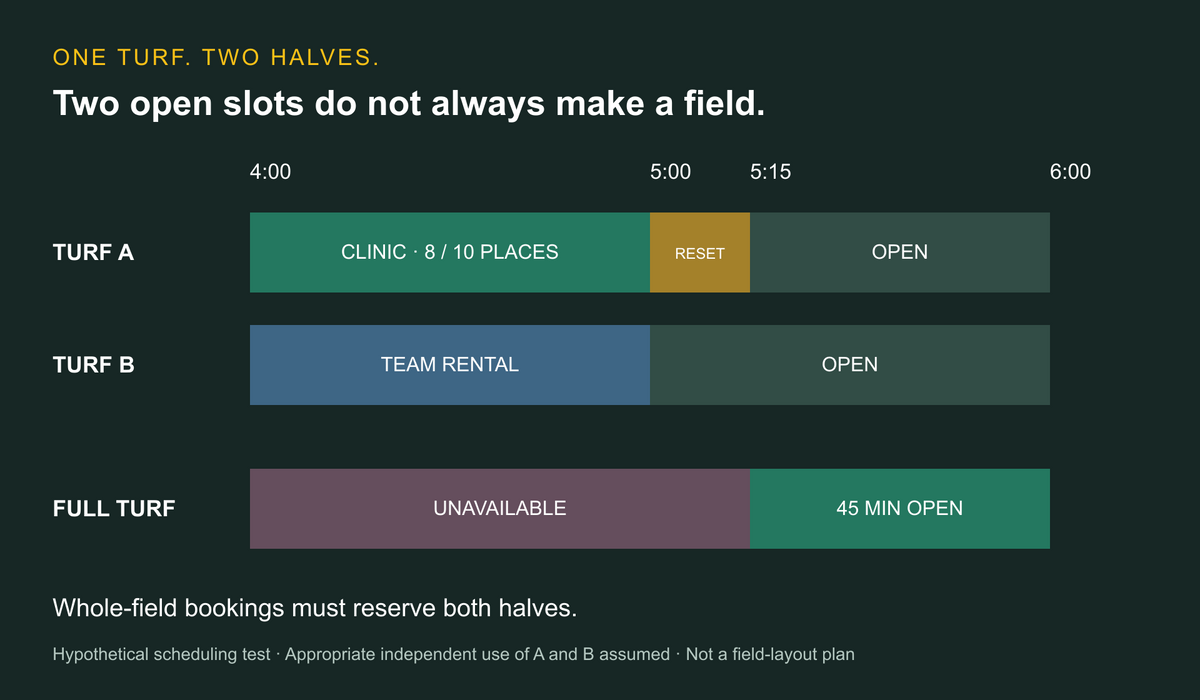
A facility might advertise “Full Turf,” “Turf A,” and “Turf B.” Those are three booking choices, but they describe one physical surface. Selling the full turf and either half at the same time would overlap.
Use this hypothetical demo setup. Assume the owner has already confirmed that A and B can be used independently for the proposed activities. This is a scheduling illustration, not a recommendation about field dimensions, containment, safe separation, or permitted activities. A calendar cannot establish those conditions.
Swipe sideways to compare all columns →
| Time | Turf A | Turf B | Full turf available? |
|---|---|---|---|
| 4–5 p.m. | Shooting clinic; Coach 1; 8 of 10 places filled | Team rental | No — both halves committed |
| 5–5:15 p.m. | Reset buffer | Open | No — A remains blocked |
| 5:15–6 p.m. | Open | Open | Yes, if no other restrictions apply |
The two-hour window contains four half-field-hours, equivalent to two whole-field-hours. The clinic and rental use one half-field-hour each. The 15-minute reset adds 0.25, leaving 1.75 half-field-hours open.
That does not mean a full field is available for 1.75 hours. Both halves are simultaneously free only from 5:15–6 p.m.: 45 minutes. The remaining 15 minutes are available on B alone.
The clinic's two unsold places are also not empty turf. Selling those places fills the existing clinic; it does not free space for an overlapping rental. Do not add the full-field calendar to the two half-field calendars when calculating physical capacity.
Run these checks before choosing a platform
- Half to whole: With the clinic booked on A, attempt a whole-field rental at 4:30 p.m. Record whether the system blocks it, warns staff, or requires manual control.
- Whole to half: In a separate test, reserve the full turf first and try to book B inside that period. The dependency needs to work in both directions.
- Clinic capacity: Add two athletes to the existing clinic, then try an eleventh. Check the configured roster limit and any waitlist behavior; do not assume it is included.
- Coach conflict: Attempt a second Coach 1 Session at 4:30 p.m. in a different space. An open space alone does not make that coach available.
- Cancellation: Cancel only the B rental. A and its reset still prevent a whole-field booking until 5:15 p.m. Inspect the refund or account credit independently from calendar availability.
- Recurring change: Move one week's clinic and verify that the remaining weeks, family registrations, and payment entitlements are unaffected unless deliberately changed.
Run the test through both staff entry and athlete self-booking. Record the configured behavior, required plan, and manual steps. For broader questions about shared resources, use our facility scheduling guide.
Keep training access, team rentals, and league fees distinct
A lesson pack buys access to specified coaching Sessions. A team rental reserves space. A league registration may involve a team, individual athletes, and scheduled games. Treat those as different products in the demonstration.
For each offering, write down who pays, who participates, what becomes unavailable, and what happens after a cancellation. Ask to see the athlete or team record as well as the payment transaction. A paid invoice alone does not establish that every participant is registered or that the right turf has been reserved.
If a club already uses another system for rosters and communication, decide which calendar owns the facility inventory. Ask vendors how they exchange information and how staff handles a failed sync; do not assume an integration exists because both products support lacrosse.
Compare the cost of the actual configuration
Swipe sideways to compare all columns →
| Quote item | Ask the vendor to specify |
|---|---|
| Subscription | Plan, included locations and staff, billing term, and renewal terms |
| Shared turf | Whole/half dependencies, buffers, recurring reservations, and staff overrides |
| Training | Lesson Credits, clinic capacity, family accounts, and coach availability |
| Payments | Processing rates, fixed fees, deposits, refunds, and any platform charges |
| Competition | League schedules, officials, standings, and modules required |
| Setup | Data migration, training, support, branded app, and messaging charges |
For budgeting, Upper Hand's advertised Grow subscription is $199 × 12 = $2,388 per year before extras and payment costs. That arithmetic describes its stated annual billing basis; it is not a total-cost estimate or a savings claim for CoachIQ.
Use the same activity mix and reservation volume for every quote. Our sports facility management software guide provides a broader vendor scorecard.
Prepare a small migration rehearsal
Before moving the whole operation, use a representative sample: a family with two athletes, an unused lesson pack, a recurring team rental, a clinic roster, and a partially paid invoice. Record what can import and what staff must rebuild.
Check one changed booking from beginning to end. Confirm the space, coach, roster, purchase balance, and message recipient. Ask payment providers about saved-card portability; do not assume a contact export includes usable payment credentials.
If lacrosse shares turf with soccer, include a cross-sport booking in the test. Our soccer facility software comparison covers the related turf scheduling decision. Keep one authoritative record of physical availability during the transition.
Questions lacrosse facility owners ask
Is team management software enough for a lacrosse facility?
Evaluate the tasks separately. Rosters, messages, and game schedules do not by themselves demonstrate whole/half-field conflict controls, coaching purchase eligibility, or rental billing. Ask your proposed tools to run the same facility test.
Can software decide whether two activities can share turf?
It can enforce the inventory rules you configure. The operator must first determine which activities and layouts are appropriate for the space. Do not use a successful booking as proof that simultaneous activities are suitable.
Which software should a coach-led lacrosse facility evaluate first?
Evaluate CoachIQ for the connection between training purchases, athletes, coaches, and Sessions. Compare the same requirements with Upper Hand, EZFacility, Swift, and Dash. Require a demonstration of your field layout and business rules before selecting a configuration.
