For a pickleball facility built around coaching, clinics, and recurring training, shortlist CoachIQ. For court reservations and member-led open play, compare CourtReserve and Playbypoint. Include EZFacility for rental administration and Upper Hand for programs tied to staff and facility resources.
The best choice depends on what you sell: a court, a place in open play, or time with a coach. Those purchases use the same physical space but need different booking rules. A facility owner needs to know who can enter, how many people can register, and what happens when someone cancels.
This guide compares five options and gives you a four-court demo worksheet. Use it to test the systems against the evening your staff actually runs.
CoachIQ publishes this comparison and is one of the products. We reviewed public vendor documentation and pricing on October 26, 2026. We have not configured and tested every platform. The recommendations are workflow-based shortlists, not independent performance rankings.
Five pickleball facility platforms to compare
Swipe sideways to compare all columns →
| Platform | Workflow to evaluate | Published pricing context | What to demonstrate |
|---|---|---|---|
| CoachIQ | Coaching, clinics, lesson Credits, and recurring training | Varies | Book the right session with an eligible Credit and available coach |
| CourtReserve | Court reservations, memberships, and rated events | Launch $199/month or $159/month billed annually; eight courts | Member access, rating eligibility, and event registration |
| Playbypoint | Open play, club bookings, payments, and retail | Essential $199/month, annual contract | A full event, a cancellation, and waitlist promotion |
| EZFacility | Court rentals, registration, and facility administration | Request a quote | Change one rental date and reconcile the invoice |
| Upper Hand | Programs, staff schedules, and facility resources | Grow $199/month paid annually | Reserve courts and coaches for a recurring clinic |
Published rates are starting references, not complete quotes. Confirm processing, onboarding, integrations, additional locations, and the plan required for each demonstrated feature.
CoachIQ: connect court time to the coaching athletes buy
CoachIQ connects Scheduling with Payments & Billing, including session packs and recurring purchases. It is worth evaluating when your facility's business includes beginner courses, private lessons, group clinics, and ongoing development.
Demo test: An athlete buys a lesson pack and books a session. Show the eligible Credit, available coach, court reservation, and cancellation outcome. Then register that athlete for a beginner clinic with a different capacity and purchase requirement.
For open play, ask the team to demonstrate your actual registration cap, waiting-list process, membership privileges, guest rules, and check-in procedure. Keep rating eligibility separate from purchase eligibility. This guide does not establish native DUPR integration, automated paddle rotation, or door-access support for CoachIQ; include those requirements in the walkthrough if your operation depends on them.
Pricing: Varies. Review CoachIQ pricing and request the setup that matches your facility. Monthly subscription, no annual contract.
CourtReserve: court access, memberships, and skill-based registration
CourtReserve documents reservations, lessons, programming, memberships, and payments. Its DUPR integration documentation is relevant when your club uses ratings to organize play.
Demo test: Set different booking windows for a member and a guest. Try to register an athlete outside your event's rating range, then try an unrated athlete. Ask what happens when an athlete's rating changes after registration. Demonstrate the rule rather than assuming that importing a rating enforces every policy.
Pricing: Launch lists eight courts at $199/month or $159/month billed annually. The pricing page lists DUPR as a $25/month Launch integration and includes it in higher plans; third-party vendor charges are separate. Confirm the complete integration cost and which rating fields your event rules can use.
Playbypoint: open play and the broader club transaction
Playbypoint's pickleball offering describes booking rules by skill level and format, automated waitlists, check-ins, waivers, club credits, retail, and rating integrations.
Demo test: Fill an open-play session, add two people to its waitlist, and cancel one registration. Inspect who receives the offer, how long they have to accept, when payment occurs, and what happens if the first person declines. Ask the team to show these settings in the plan being quoted.
Pricing: Essential is $199/month, Advanced $399, and Premium $599, based on annual contracts. Essential lists reservations, programs, and lessons; Advanced adds merchandise and a club account system. The page lists card fees of 2.9% + $0.30 for Essential and 2.7% + $0.15 for Advanced and Premium. Confirm your payment mix and any extra services before comparing totals.
EZFacility: rentals and administrative control
EZFacility's pickleball software covers facility scheduling, membership management, registration, billing, and related operations. Evaluate it around the rental and administrative work your staff performs.
Demo test: Create a recurring court rental and collect payment. Cancel one date, leave the rest intact, and inspect the invoice and released court time. Then try an event with individual registrations occupying several courts. Ask how staff prevents those courts from also being rented.
Pricing: Request a tailored quote. Include implementation, required modules, and payment processing. Our CoachIQ vs. EZFacility guide adds questions about rental workflows and coach-athlete workflows. The distinction is the work you need to manage, not facility size.
Upper Hand: programs with staff and court resources
Upper Hand lists scheduling, registration, memberships, and facility/resource management across its plans. It belongs on the shortlist when your pickleball operation combines coaching programs with resource and staff administration.
Demo test: Set up a weekly clinic that needs two courts and one coach. Move one occurrence, then check registrations, resource availability, coach assignment, charges, and notifications. Ask separately about open-play queues and rating integrations; general program scheduling does not prove either requirement.
Pricing: Start is $79/month and Grow is $199/month, paid annually. Grow lists facility/resource management and staff/payroll tools. Price the demonstrated workflow, including optional enhancements. Our CoachIQ vs. Upper Hand comparison provides additional buying questions.
The four-court open-play test
A reservation system can show a full evening while staff still has no clear answer to “How many more people can we admit?” Test physical capacity and registration capacity separately.
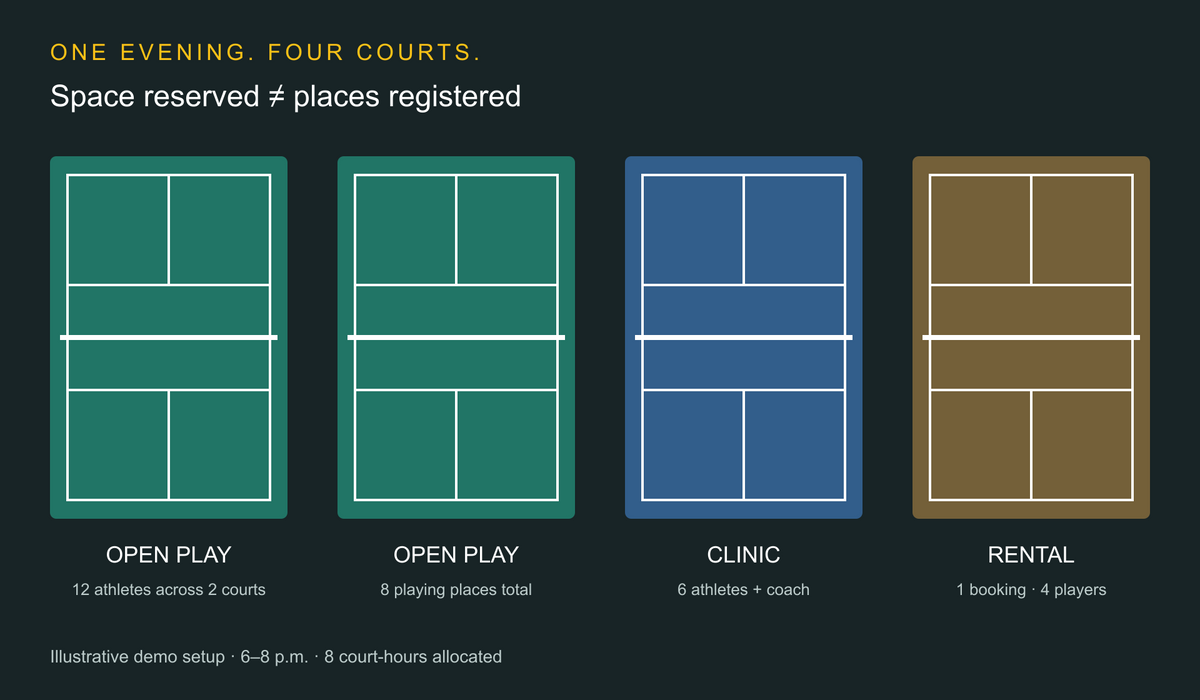
This is an illustrative acceptance test, not a customer result or an industry capacity standard. Assume four independently usable courts, a two-hour block from 6–8 p.m., and doubles play. Your operator chooses a 12-person registration cap for open play on two courts, accepting that some people rotate off.
Swipe sideways to compare all columns →
| Offering | Courts reserved, 6–8 p.m. | Registration rule | Court-hours used |
|---|---|---|---|
| Open play | Courts 1–2 | 12 registered athletes, with rotation | 4 |
| Beginner clinic | Court 3 | Six athletes and one coach | 2 |
| Private doubles rental | Court 4 | One booking for four players | 2 |
All eight court-hours are allocated: four courts × two hours. Open play has eight simultaneous playing places: two courts × four players. With all 12 registrants present, four rotate off at any moment. That arithmetic does not predict waiting time; game lengths and your rotation policy determine the experience.
There are 22 participant places across the evening: 12 open-play registrations, six clinic registrations, and four rental players. Those are not 22 court reservations, and the clinic coach is a separate staff assignment.
Ask each vendor to run these five actions
- Try a conflicting sale. Attempt to rent Court 2 during open play. Show whether the system blocks it or requires staff intervention.
- Add a thirteenth registrant. Show what happens at the 12-person cap. A waitlist place must be distinguishable from an admitted registration.
- Cancel and refill one place. Inspect the original charge or Credit, the offer to the next eligible athlete, acceptance timing, and the replacement payment.
- Check in a guest. Verify membership price, any guest charge, waiver status, and attendance. Confirm which checks happen automatically.
- Close one open-play court. With one court remaining, only four people can play simultaneously. Keep all 12 registrations and eight would be off court. Show how staff finds affected athletes, changes capacity or offers remedies, and communicates the decision.
Do not assume closing a court changes an event cap, refunds money, or contacts athletes. Have the vendor demonstrate each outcome. Your facility sets the cancellation and disruption policy; software should make the consequences visible.
Copy this worksheet into your demo notes
Swipe sideways to compare all columns →
| Requirement | Demonstrated in quoted plan? | Automatic or staff action? | Extra fee or tool? |
|---|---|---|---|
| Reserve courts separately from event seats | Record result | Record steps | Record cost |
| Enforce membership and rating eligibility | Record result | Record steps | Record cost |
| Fill a cancellation without exceeding capacity | Record result | Record steps | Record cost |
| Reconcile payment, Credit, and attendance | Record result | Record steps | Record cost |
| Resolve a court closure and notify affected athletes | Record result | Record steps | Record cost |
Compare the full cost of a busy month
Ask for the subscription, processing percentage, per-transaction fee, integration fees, setup costs, and contract term in one written quote. Small purchases make the fixed transaction fee worth inspecting.
For an illustrative calculation, assume 1,000 separate $15 card payments, each charged 2.9% + $0.30. Processing would be $435 + $300 = $735 on $15,000 collected, before subscription or other charges. This uses Playbypoint Essential's published rate as an example, not a forecast or a claim that all providers charge it. Membership billing, ACH, refunds, and different card terms can change the result.
Keep court occupancy, attendance, and money collected separate. If open play is included in membership dues, an occupied court does not automatically create another admission sale. Our facility management software guide covers the wider operating decision.
Before you switch systems
Test a member with a guest, an unused lesson pack, an unpaid balance, a future clinic, a recurring rental, and a waitlisted athlete. Confirm what imports, what staff must rebuild, and whether waivers and rating identifiers transfer. Ask the payment providers about saved-card portability.
Choose one system to own the court inventory during cutover. Pause competing booking channels until you reconcile future bookings and balances. For spaces that convert between tennis and pickleball, test conflicts in both directions; our tennis facility software guide includes shared-layout questions. The facility scheduling guide covers additional resource checks.
Questions facility owners ask
Is court booking the same as open-play registration?
No. A court rental reserves space for a group. Open play sells or allocates individual places within an event using one or more courts. Your demo should show both the court inventory and the registration cap.
Does a DUPR integration run the whole event?
Do not assume that. Rating import, eligibility checks, match creation, score submission, and on-site rotation are separate jobs. Ask which ones the vendor demonstrates, which need another service, and which remain with staff.
Which platform should a coaching-led pickleball facility evaluate first?
Start with the purchases and programs that drive your business. CoachIQ is worth evaluating for connected coaching, Credits, recurring training, and athlete communication. Run the same court, guest, open-play, and cancellation tests against every shortlisted platform.
Bring your busiest evening, your membership rules, and the worksheet to a walkthrough. Ask to see the entire booking-to-payment workflow with those requirements.
