Start with the lessons, cage rentals, team practices and camps you plan to offer. Map a busy week to see which activities need space at the same time. Use that schedule to plan the layout, request equipment and installation quotes, and build your opening budget.
The opening-budget worksheet includes a blank budget, a 12-month cash forecast and worked examples to help you estimate when payments come due and how much cash you’ll need.
About the numbers: Public prices below were checked November 16, 2026, in U.S. dollars. They are advertised component prices; confirm your selected configuration and delivered/installed quote. Examples labelled hypothetical use teaching assumptions and do not describe customer results. Products are price references, not tested recommendations.
1. Plan the activities and the weekly schedule
List the services you intend to sell before deciding how many cages to install.
| Activity | Decide before planning the space |
|---|---|
| Hitting lessons | How many coaches and athletes will use each lane, and what equipment will they need? |
| Cage rentals | Which activities and equipment are included, and what supervision is required? |
| Baseball pitching | What distances and mound setup will you use, and where will equipment move or be stored? |
| Softball pitching | What surface, distances and protective setup will you need? |
| Team sessions and camps | How many athletes will attend, which stations will they use, and which areas must be reserved together? |
Put a sample busy week beside your proposed layout. Check which activities overlap, where athletes wait and where equipment is stored. Match each lesson to an available coach and training area.
If you plan to move or retract dividers, ask the installer for drawings showing both configurations. Include net storage, equipment movement and the time needed to change the setup.
Hypothetical operating example: Individual lessons run in divided lanes before a team practice. Reserve every lane the team needs, including time to move equipment and reset the space. Ask the installer to confirm clearances and which activities can safely run together.
2. Check the building and lease timeline
Measure the usable training area and mark columns, doors, ceiling obstructions and existing rooms on the plan. Record the available utilities. Keep total leased square footage separate from the space available for training.
Review these questions with the landlord, local authorities and qualified design and installation professionals:
- Is the intended use permitted, and which approvals are still needed?
- Can the building support the proposed net system?
- What work is needed for entrances, exits, accessibility, lighting, electrical service, heating, cooling and restrooms?
- Who pays for each item, and when is payment due?
Use local quotes for rent, utilities, insurance and applicable fees. SBA business-location guidance
Put the dates for building access, installation, rent commencement and expected opening on one timeline. Record what any rent concession covers and which charges remain payable. Check which bills would still be due if equipment delivery or approvals delayed opening.
Hypothetical layout calculation
Two nets measuring 70 feet long by 14 feet wide cover a combined rectangular area of:
2 × 70 × 14 = 1,960 square feet
This calculation covers the net dimensions only. The actual layout also needs installer-confirmed clearances, circulation, storage and other rooms. Use the installer’s materials schedule to calculate the turf order.
3. Price equipment and installation separately
Request quotes for the exact products and quantities in your layout. Ask suppliers to separate equipment, support systems, installation, freight and tax so you can see what each quote includes.
| Component | Advertised price, checked November 16, 2026 | Scope to confirm |
|---|---|---|
| Nets & More net S-CS36247, #36 black nylon square mesh, 70 L × 14 W × 12 H feet | $1,957 each | Cables excluded; confirm supports, hardware, installation and delivery/tax |
| On Deck Sports GT34 Padded turf rolls | $1,785–$3,468 across roll options | Listed options are 15 feet wide and 35, 55 or 70 feet long; verify the selected size’s price and installed scope |
| JUGS Protector Series L-Shaped Screen S6000 | $795 each | Listing includes wheel kit and free shipping; confirm destination terms and suitability |
| JUGS BP1 Combo machine JRPMBS-00 | $1,995 | Confirm U.S. 110V configuration, compatible balls, operating instructions and delivery/tax |
Choose the turf roll size before entering its price in your budget. Ask the installer to include cuts, waste, seams, fastening materials, floor preparation and labor. Confirm delivery charges and destination restrictions with the supplier.
Decide who may operate pitching machines and what training or supervision is required. Check the manufacturer’s instructions and your insurer’s requirements, then include equipment permissions in your rental rules.
Track each purchase through quoted, ordered, delivered, installed and checked for intended use. Assign someone to each step and record when the equipment must be ready for bookings.
Hypothetical equipment subtotal
| Example purchase | Amount |
|---|---|
| Two nets at the draft’s listed price | $3,914 |
| Two protective screens | $1,590 |
| Nets and screens subtotal | $5,504 |
| Optional combo pitching machine | $1,995 |
| Total with optional machine | $7,499 |
This is a partial equipment subtotal. Add turf, supports, installation, other equipment, building costs, freight and tax as separate budget lines where they are not already included in a quote.
4. Complete the opening-budget worksheet
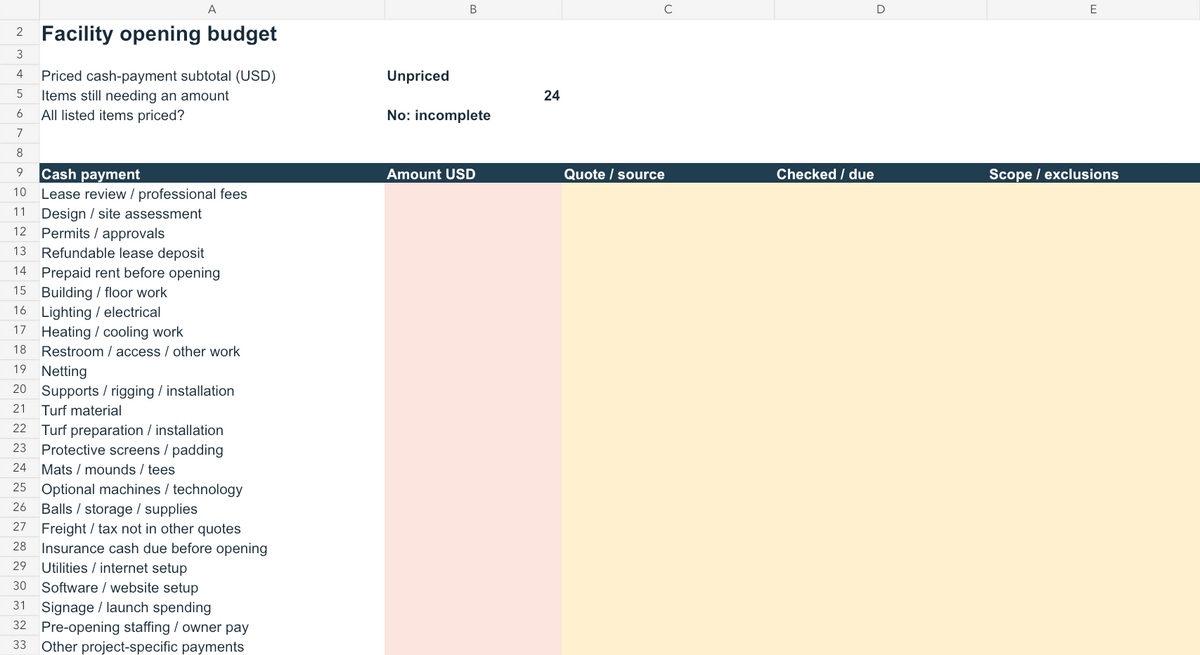
Download the worksheet and start with the Opening budget tab. For each item, enter the full quoted amount, the supplier or source, the date checked or payment due, and what the quote includes.
Enter the total for the quantity you need. For example, enter the cost of both nets on the netting line, and record the quantity and model in the quote reference.
Leave amounts blank while you’re waiting for a quote. Enter zero only when you’ve confirmed there is no separate payment, and explain why. The subtotal adds the amounts entered so far; check the missing-amount count before treating the budget as complete.
| Budget category | Include |
|---|---|
| Space and approvals | Lease review, design, deposit, prepaid rent and applicable fees |
| Building work | Floor work, lighting, electrical, heating/cooling, restrooms and access |
| Training area | Netting, supports, installation, turf, protective equipment, mats and mounds |
| Operating equipment | Balls, tees, storage, cleaning/first-aid supplies and optional technology |
| Opening operations | Insurance, utilities/internet setup, software/website setup, signage and launch spending |
| Pre-opening people costs | Staffing and owner pay needed before opening |
Enter a bundled contractor quote once unless the supplier provides a breakdown. If it includes items listed elsewhere, enter zero on those overlapping lines and note which quote covers them.
Record refundable deposits, prepaid rent and fees separately. Note what each payment covers, when it is due and whether it will be credited against a later bill.
Request insurance quotes for the activities you plan to offer. Review the proposed coverage and exclusions with your insurer or broker.
NAIC small-business insurance guidance
Hypothetical rent calculation
Assume a 4,800-square-foot space at $12 per square foot per year. These are invented inputs for showing the calculation:
- Annual base rent: 4,800 × $12 = $57,600.
- Monthly base rent: $57,600 ÷ 12 = $4,800.
- Four months of base rent: $4,800 × 4 = $19,200.
Replace these assumptions with your lease’s actual area, rate and payment dates. Add deposits and other occupancy charges separately. Four months is an arithmetic example, not a recommended cash reserve.
5. Forecast cash from the first project payment
Open the Monthly cash tab. Label the 12 months starting with the month you expect to make your first project payment. Enter the cash available at the beginning of that month.
Enter money in the month you expect to receive or pay it:
- Cash coming in: athlete payments, rental payments, financing and landlord reimbursements.
- Cash going out: opening purchases, building work, rent, staffing, owner pay, utilities, insurance, software and other payments.
Transfer opening-budget payments into the appropriate months yourself. Enter each payment once; don’t add the opening-budget subtotal as another expense.
Fill every monthly input with an estimate, including zero where you expect no cash movement. Blank inputs leave the affected calculations marked Missing input.
Net cash change = cash received − cash paid Ending cash = beginning cash + net cash change
The worksheet carries each month’s ending cash into the next month. Keep financing and landlord receipts on their separate rows so you can distinguish those funds from athlete and rental collections.
Match expected collections to services you can deliver. Allow for team bookings, maintenance and changeovers when estimating rental availability. Count each available training hour once, and account for future bookings owed to athletes who pay upfront.
For team or organization bookings, record the expected payment date, included services and booking limits. Keep tentative interest separate from confirmed commitments.
Check reimbursement timing against the bills you must pay first. Then try a later opening date or lower collections and note which months show a cash shortfall.
6. Compare complete quotes and set booking rules
Compare quotes on the same scope
Send each supplier the same activity brief and measured plan. Request exact products, quantities, included work, exclusions, payment dates, lead times and quote expiration.
Before comparing totals, check that each quote covers the same work. Resolve missing installation, support-system, freight, tax or building-work costs. Record any remaining exclusions beside the quoted amount in your budget.
Write booking rules for each service
Before opening bookings, define:
- Space and staffing: Which training area is reserved, and is a coach required?
- Time and capacity: How long is the booking, how many athletes may attend, and what setup or reset time is needed?
- Equipment: What is included, who may use it, and what supervision applies?
- Payment: Is payment due when booking, or can athletes use eligible package or membership Credits?
- Changes and cancellations: What happens to the booking, payment or Credits when someone cancels or reschedules?
For team sessions and camps, reserve every affected training area and include setup and reset time. Check that the same space remains unavailable for overlapping lessons or rentals.
Use the baseball lesson scheduling guide to plan your booking setup. Compare software options in our baseball or softball facility software guides.
CoachIQ publishes this guide and provides scheduling and payment software for coaches and the facilities they run. Bring your service list, coach availability, training areas and booking rules to a walkthrough.
Research note: Sources are linked beside the relevant facts. Examples are hypothetical. Customer financial and identifying details are excluded.
