Shortlist CoachIQ for a golf training facility built around lessons, clinics, and recurring athlete development. Compare Golf O'Clock and Birrdi for simulator reservations and venue automation, USchedule for golf instruction and indoor reservations, and foreUP when tee sheets and course operations are central to the business.
A golf facility might sell a lesson with a pro, an hour in a simulator, or a tee time on a course. Each purchase reserves something different. Start by identifying the space, staff, and equipment that must be available together.
This guide focuses on coach-led training facilities and indoor golf businesses. It also explains where course-management software fits, so an owner can build a relevant shortlist instead of comparing five interchangeable calendars.
CoachIQ publishes this comparison and is one of the products. Public vendor documentation and pricing were reviewed on October 26, 2026. We have not configured and tested every system. These are workflow-based recommendations, not independent performance rankings.
Five golf facility software options to evaluate
Swipe sideways to compare all columns →
| Platform | Workflow to evaluate | Published pricing context | Useful demo test |
|---|---|---|---|
| CoachIQ | Lessons, clinics, Credits, recurring training, and athlete communication | Varies | Reserve a coach and bay against the correct lesson purchase |
| Golf O'Clock | Simulator booking, memberships, access, and bay control | Standard $150/month for four bays; $25 per additional bay | Extend a session without colliding with the next reservation |
| Birrdi | Simulator reservations with Square and venue integrations | $0.25–$1 per reservation by monthly volume, plus setup | Apply member hours and reconcile the booking with payment |
| USchedule | Golf instruction and indoor facility reservations | Request a quote; no public rate verified in this review | Move a lesson while keeping coach and resource availability aligned |
| foreUP | Course tee sheets, POS, billing, and time-based reservations | Request a quote; no public rate verified in this review | Coordinate course and simulator sales in the proposed setup |
Confirm payment processing, hardware, third-party subscriptions, setup, support, and contract terms. A booking platform does not replace the simulator's gameplay or launch-monitor license.
CoachIQ: organize the business around the athlete's training
CoachIQ connects Scheduling, Payments & Billing, and athlete records. For a golf training facility, that means evaluating the full journey from a purchased lesson pack to a booked Session and the next training visit.
Demo test: An athlete owns a private-lesson pack and a recurring training membership. Book a lesson with an available pro, identify the bay required, and inspect which Credit is used. Try a second booking that conflicts with the same pro or bay. Cancel the first lesson and check the athlete balance, staff calendar, and available inventory separately.
Include clinics, family accounts, and off-session training content if they are part of your business. Ask the team to demonstrate the rules with your actual products and resources.
For an unattended simulator venue, add separate requirements for door access, simulator activation, session expiry, and remote support. Native hardware integrations and automatic simulator shutdown are not established by this review; confirm the exact setup during a walkthrough.
Pricing: Varies. See CoachIQ pricing. Monthly subscription, no annual contract.
Golf O'Clock: simulator reservations and venue automation
Golf O'Clock describes bay booking, memberships, payments, access control, and Screen Marshal for controlling access to simulator PCs. Its documentation also notes that it has no league-management module or built-in POS terminal; those workflows use recurring blocks or other software.
Demo test: Extend a paid reservation by 30 minutes. Show what happens if another booking follows immediately, and check the door and bay access windows. Use your actual simulator PC, software, and lock configuration in the demonstration.
Pricing: Standard costs $150/month for four bays, plus $25 per additional bay. Advanced starts at $250/month for six bays and covers more complex automation or scripting. Plans are month-to-month with no per-booking fee. Payment-provider and hardware costs still belong in your quote.
Birrdi: simulator bookings connected to Square
Birrdi's simulator offering documents memberships, lessons, Square POS integration, RemoteLock integration, and launch-monitor control. It explicitly separates league registration and payments from competition scoring through services such as SGT, TrackMan, or Golf Genius.
Demo test: Use included membership hours for a booking, change its duration, and inspect the remaining balance and Square transaction. Ask which simulator and access-control models are supported and what staff handles when an integration is unavailable.
Pricing: Birrdi publishes reservation-based pricing: $1 each for 1–100 monthly reservations, $0.60 for 101–500, $0.40 for 501–1,000, and $0.25 for 1,001+. The reached tier applies to all reservations that month. Setup options are $500, $1,000, or $2,000. Ask which bookings count, including cancellations and member bookings, and confirm processing and integration charges.
USchedule: golf instruction and indoor reservations
USchedule presents separate coaching and indoor-golf solutions. Its published feature areas include lessons, camps and clinics, packages, memberships, payments, records, and indoor door access.
Review both its coaching booking workflow and indoor reservation workflow if your facility combines the two.
Demo test: A pro teaches in a simulator bay in the morning and outdoors in the afternoon. Change one lesson's location and check the pro's availability, resource reservation, package use, and athlete notification. Then book simulator-only practice without assigning a pro.
Pricing: Request an itemized quote. We did not verify a public dollar rate on the pages reviewed. Include the proposed coaching and indoor modules, branded app, payment services, and access hardware rather than assuming all features share one price.
foreUP: when the facility also operates a golf course
foreUP documents tee sheets, course POS, billing, food and beverage, and other course operations. Its time-based reservations offering extends the evaluation beyond tee times.
Demo test: Show a course tee time and a simulator reservation, then trace payment and reporting for each. Confirm how coaching purchases and instructor availability fit your proposed configuration.
Pricing: Request a quote; this review did not verify a public rate. The reason to include foreUP is the course-operating workflow, not the size of your facility.
The bay-and-coach demo: one available resource is not enough
An open simulator bay does not mean a lesson is available. The pro may be teaching elsewhere. An available pro does not mean the required launch monitor or fitting equipment is free.
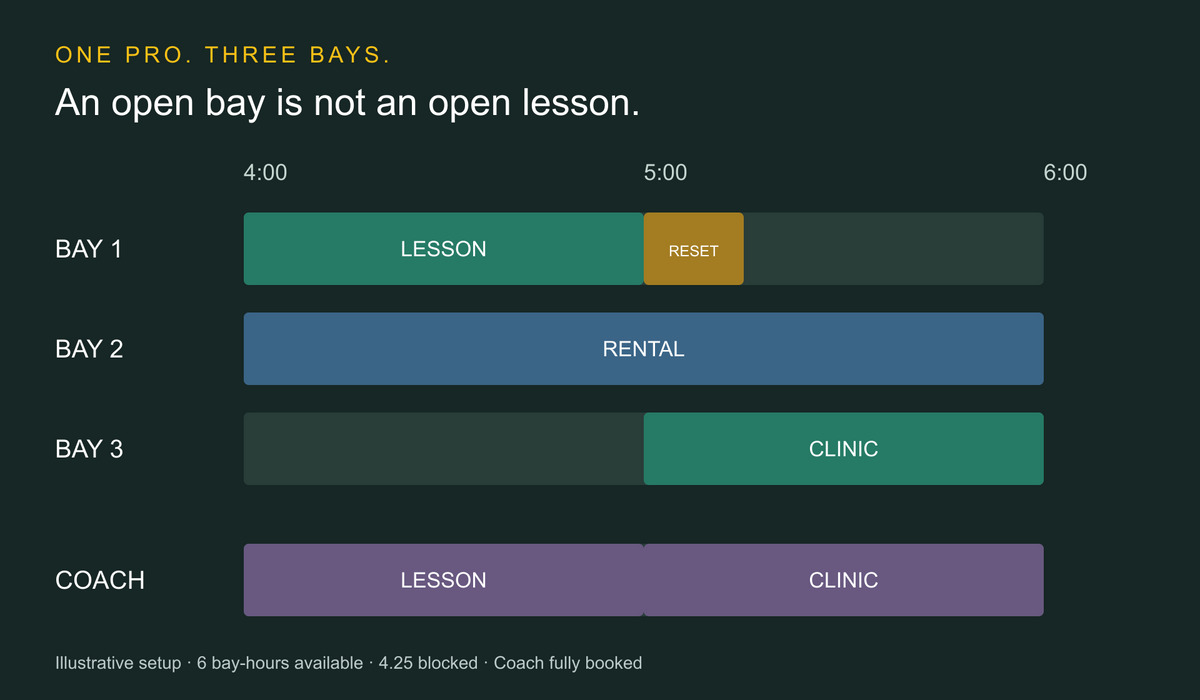
Use this hypothetical acceptance test. Assume three independently usable bays, one shared pro, and a 4–6 p.m. window. Every reservation below blocks its stated bay; the clinic uses the pro throughout its scheduled time. The buffer is an operator-selected policy, not an industry standard.
Swipe sideways to compare all columns →
| Bay | Planned use | Staff needed | Blocked time |
|---|---|---|---|
| Bay 1 | Private lesson, 4–5 p.m.; reset, 5–5:15 p.m. | Pro for the lesson | 1.25 bay-hours |
| Bay 2 | Simulator rental, 4–6 p.m. | No pro assigned | 2 bay-hours |
| Bay 3 | Clinic, 5–6 p.m., four athletes | Same pro | 1 bay-hour |
The window contains six bay-hours: three bays × two hours. Booked activity uses four bay-hours. The 15-minute reset brings blocked inventory to 4.25 bay-hours, leaving 1.75 bay-hours open: Bay 3 from 4–5 p.m. and Bay 1 from 5:15–6 p.m.
The pro is committed for the full two hours. Those open bay periods are therefore not automatically available for another coached lesson. This is an inventory calculation, not a utilization benchmark or revenue forecast. It assumes no travel time between bays; add your own transition policy if needed.
Run these five checks in the quoted plan
- Try the wrong resource. Book another lesson at 4:30 p.m. in an empty bay. Inspect the pro conflict rather than only the bay calendar.
- Protect the reset. Attempt a Bay 1 rental at 5 p.m. The test should reveal whether the 15-minute buffer blocks inventory or is only a staff note.
- Close Bay 2 at 4:30 p.m. Inspect the rental's remaining 90 minutes, payment remedy, notification, and alternative capacity. No other bay is free for the entire remaining period without changing existing commitments.
- Try a late extension. Extend Bay 1's lesson to 5:30 p.m. and inspect the pro's 5 p.m. clinic conflict. A successful payment must not be mistaken for a workable schedule.
- Reconcile the result. Show the revised calendar, Credits, cash collected or refunded, and unresolved staff actions. Cancellation, refund, and inventory release are separate outcomes to check.
Our facility scheduling guide adds questions for shared staff, spaces, and equipment.
Use a quote worksheet that matches your business
Swipe sideways to compare all columns →
| Cost or requirement | What to request |
|---|---|
| Software subscription or usage fee | Price at your actual bay count and expected reservation volume |
| Setup and migration | Contacts, memberships, unused hours, lesson packs, future bookings, and training |
| Payments | Percentage and fixed fees, refunds, chargebacks, and optional hardware |
| Venue automation | Supported lock, PC, launch-monitor model, third-party charges, and outage procedure |
| Coaching operations | Coach conflicts, lesson Credits, clinic seats, and required resources |
| Reporting | Separate bay occupancy, coaching revenue, membership sales, and cash receipts |
A simple illustrative cost comparison shows why the pricing model matters. For four bays and 300 billable reservations in a month, Golf O'Clock's published Standard base is $150, while Birrdi's reservation charge is 300 × $0.60 = $180. Birrdi setup is additional. These figures exclude processing, hardware, optional services, and taxes; they do not establish equivalent functionality or total cost.
Ask for a second quote at your expected busy-season volume. Do not multiply today's reservation fee blindly across the year when the vendor uses monthly volume tiers.
Match membership promises to usable time
Write down what the membership includes: practice hours, coached Sessions, discounts, priority booking, or some combination. Ask how the proposed system handles peak-time restrictions, expiry, rollover, guests, and a balance adjustment after a cancellation.
Keep these entitlements distinct. An athlete who owns ten practice hours may not own ten lessons. A clinic with four registrations may use one bay. A four-person simulator rental may be one booking with one payer. Ask the vendor to show those differences in both checkout and reporting.
For the wider business decision, see our sports facility management software guide. If you are building the operating model, our facility profit calculator can help organize assumptions; it is not a golf-specific forecast.
Before moving bookings to a new system
Test a representative sample: an active membership, unused practice hours, a lesson pack, an outstanding balance, a future clinic, and a recurring bay rental. Confirm which records transfer and which staff must rebuild. Ask the payment providers about saved-card portability rather than assuming it.
Choose one calendar to own each bay during cutover. Reconcile future bookings and balances before opening the new booking flow. If the venue is unattended, test the approved access and support process before relying on it for an operating shift.
Questions golf facility owners ask
Is facility software the same as simulator software?
No. Facility software manages business tasks such as reservations and payments. Gameplay, ball tracking, and launch-monitor data belong to the simulator technology. Confirm any connection between them against the exact hardware and software you use.
Do I need a tee sheet or a bay calendar?
Start with what you reserve. A course sells tee times; an indoor venue reserves bays for durations; coaching also needs an available pro. A mixed facility should demonstrate all relevant workflows, including conflicts between them.
Which platform should a coaching-led golf facility evaluate first?
Evaluate CoachIQ around the relationship between training purchases, Sessions, athletes, and staff. Compare the same requirements with specialist golf platforms. Bring your actual membership rules and the bay-and-coach worksheet to the demo.
