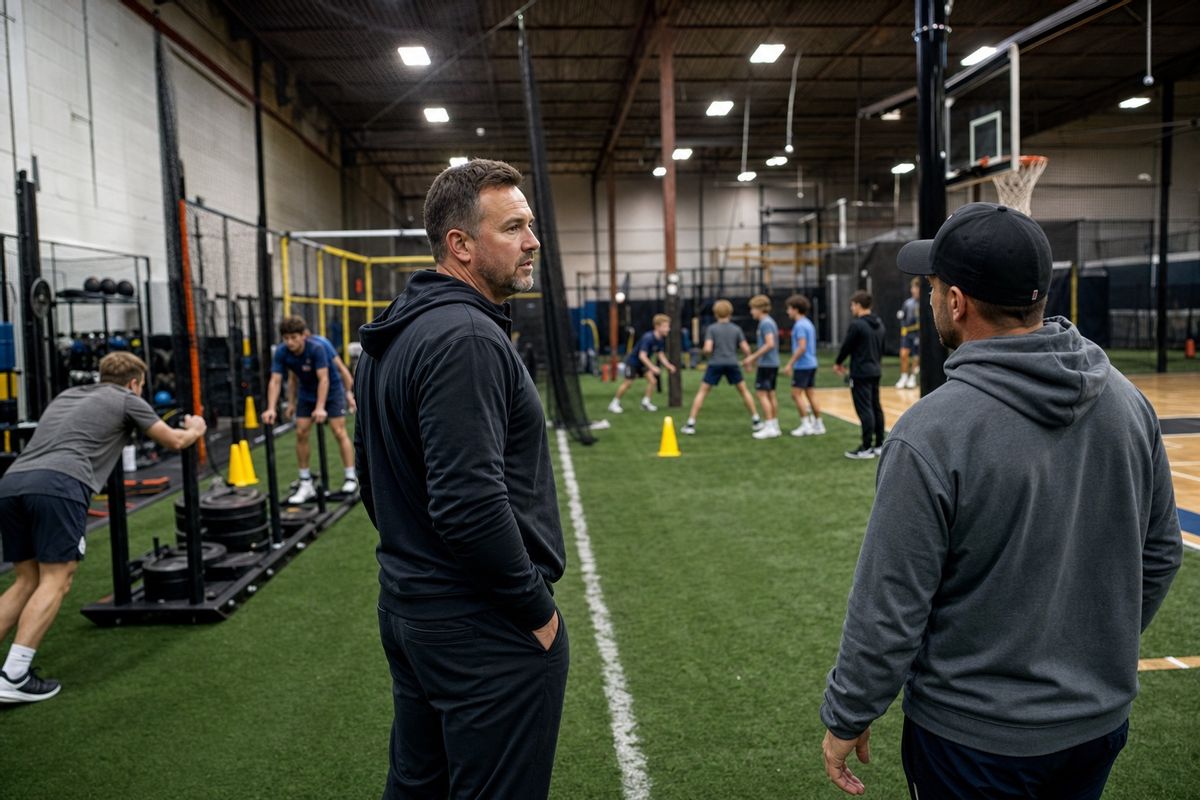
Sports training facility owner overseeing coaches and athletes across an indoor multi-use training floor
Guide

How to Run a Sports Training Facility in 2026

Learn how to run a sports training facility with practical systems for capacity, scheduling, staff, payments, athlete retention, and weekly reporting.

By CoachIQ July 22, 2026

Last updated: July 22, 2026

Quick answer: Running a sports training facility comes down to five connected systems: a clear revenue model, capacity-based scheduling, defined staff responsibilities, reliable payment and communication workflows, and a weekly scorecard. When those systems share one source of truth, the owner can grow without personally coordinating every session, payment, and schedule change.

Most facility owners do not struggle because they lack coaching knowledge. They struggle because every decision still routes through them.

A coach needs to move a session. A parent cannot find the right scheduler. A cage looks open, but another program already needs it. A payment failed three days ago. None of these problems is dramatic by itself. Together, they turn the owner into a full-time dispatcher.

Learning how to run a training facility means building an operating system that works when you are coaching, meeting a new family, or taking a day off. The goal is not to automate the human parts of the business. It is to stop using human effort for work that should already have a rule.

1. Start With the Facility's Operating Model

Before changing software or hiring another coach, write down how the facility makes money.

Most coach-led training facilities use some combination of:

  • Private sessions
  • Small-group training
  • Recurring memberships or subscriptions
  • Camps, clinics, and team programs
  • Facility or equipment rentals
  • Digital training programs

Each offer uses the facility differently. A private pitching lesson may require one coach, one mound, and one athlete. A six-athlete hitting group may use one coach and two cages. A team rental may occupy the full turf area without using a coach.

Put every offer into one table:

Offer Who buys it? Coach required? Space required? How is it sold? Main constraint
Private session athlete or parent Yes One training zone Single purchase or credits Coach time
Small group athlete or parent Yes Shared training zone credits or subscription Capacity
Camp or clinic athlete or parent Yes Large block of space Registration Dates and staffing
Rental Team or outside coach No or optional Specific resource Hourly booking Space

The last column matters most. It tells you what limits growth. If prime-time coach hours are full but space is available, hiring may unlock capacity. If every cage is occupied from 4 p.m. to 8 p.m., another coach will not fix the bottleneck.

Do this exercise before adjusting prices. CoachIQ's guide to pricing sports coaching services can help you turn the operating model into clear packages and commitments.

2. Calculate Capacity Before Adding More Sessions

Capacity is not the number of hours your doors are open. It is the number of sessions your coaches and spaces can support at the same time.

Start with four inputs:

  1. Available coach hours
  2. Available resource hours
  3. Athlete capacity for each session type
  4. The hours families actually want to book

Here is an illustrative example—not an industry benchmark:

A facility has three training zones available for 30 prime-time hours each week. That creates 90 possible resource-hours. If booked sessions use 62 of those hours, resource utilization is 62 ÷ 90, or about 69%.

That number is useful only when you break it down. One zone may be nearly full while the other two sit open. Tuesday may be packed while Friday is empty. Your decision should follow the constraint:

  • High demand, no space: change the session mix, extend hours, or add space.
  • High demand, open space, no coach: add coach availability or hire.
  • Open coaches and open space: improve the offer, timing, or marketing before adding capacity.
  • Full private sessions, empty groups: move appropriate athletes into a group pathway.

Do not treat 100% utilization as the goal. A facility needs room for assessments, makeups, maintenance, staff training, and seasonal changes. Establish your own baseline, then watch how it changes over four-week periods.


3. Build One Weekly Scheduling System

A shared calendar is not a scheduling system. A real system connects coach availability, session rules, athlete booking, payments, and physical resources.

Set it up in this order:

  1. Create recurring availability for each coach.
  2. Create a scheduler for each session type.
  3. Set duration, capacity, booking notice, cancellation rules, and payment method.
  4. Attach the required court, cage, room, mound, or turf area.
  5. Test the booking as a parent on a phone.
  6. Test a conflict before sharing the scheduler publicly.

CoachIQ Resources can represent courts, cages, rooms, and equipment. Attaching a resource to a scheduler reserves it during booked sessions, including cases where one session needs several spaces.

This distinction matters. Two coaches can be free at 6 p.m. while the same cage is not. The calendar must account for people and space.

If baseball or softball is your main sport, the baseball lesson scheduling software guide shows how to test shared-resource conflicts during a vendor demo. The same principle applies to courts, turf, pools, mats, and training rooms.

For a deeper setup comparison, see the guide to sports facility scheduling software.

4. Define the Owner's Job and Every Coach's Job

Delegation fails when the owner hands over a task but keeps every decision.

Write down who owns each recurring responsibility, what "done" means, and when the owner needs to be involved. A simple responsibility matrix is enough:

Responsibility Owner or operations lead Coach Front desk or admin
Set pricing and policies Decides Gives feedback Documents changes
Maintain coach availability Reviews exceptions Updates own availability Checks weekly coverage
Check in athletes Handles exceptions Owns for each session Supports peak periods
Record session notes Reviews quality Completes after session Flags missing notes
Reschedule bookings Sets the rule Works within the rule Handles standard requests
Payment exceptions Decides refunds or credits Does not promise changes Collects facts and routes issue
Open and close facility Sets checklist Completes assigned shift Verifies checklist

The exact assignments will change by facility. The principle does not: routine work should have an owner before it becomes urgent.

Permissions should match those responsibilities. CoachIQ supports Admin and Coach roles, with page-level blocks for the Coach role. The staff management guide explains how owners can keep financial and business settings restricted while giving coaches access to the tools they need for sessions and athlete communication.

Permissions are not an operating procedure. Pair access with a short onboarding checklist:

  • How to open and close the facility
  • How to check in an athlete
  • Where to record notes
  • What a coach may reschedule
  • Which issues go to the owner
  • How to respond to an injury or facility problem
  • What must be completed before leaving

For the hiring side, use the trainer hiring and onboarding guide. Employment classification, payroll, insurance, and safety requirements vary by location, so confirm those decisions with qualified local professionals.

5. Standardize Payments, Credits, and Policies

Every exception becomes admin work. The fastest way to reduce that work is to make the normal path obvious.

Decide these rules in writing:

  • Which offers require payment before booking
  • Which offers use credits
  • Whether credits expire or roll over
  • Which schedulers accept each credit product
  • How far in advance athletes can book
  • When cancellations return a credit
  • Who can approve refunds, makeups, or manual credits

Credits work well when an athlete buys several sessions upfront but still needs booking flexibility. In CoachIQ, products can issue credits and schedulers can accept them. The credit-based scheduling guide walks through that two-part setup.

Keep the policy easy to explain. For example:

Athletes buy a monthly product, receive four credits, and use one credit for each eligible session. Cancellations made before the published cutoff return the credit. Later cancellations follow the facility's stated policy.

Test the complete path with a test athlete before launch: purchase, credit delivery, booking, cancellation, rescheduling, and balance history. A policy is not complete until the software behaves the same way the written rule describes it.

6. Create One Repeatable Athlete Experience

The athlete experience begins before the first session. Map the full path:

Inquiry → assessment → recommendation → purchase → booking → reminder → session → follow-up → next booking

For every step, answer three questions:

  1. What does the athlete or parent need to do?
  2. What does the team need to do?
  3. What should happen automatically?

A new inquiry might receive an assessment link automatically. An assessment booking can trigger directions and arrival instructions. A completed first session can trigger a follow-up and the recommended next scheduler.

CoachIQ's automation playbook documents workflows for new leads, first bookings, member onboarding, inactive athletes, and expiring credits. Start with two or three high-frequency moments. A short, reliable automation is more useful than a complicated chain nobody checks.

The owner should review automated messages quarterly and whenever a policy changes. Automation removes repetition; it does not remove accountability.

7. Run a 30-Minute Weekly Operations Meeting

The weekly meeting is where small problems stay small. Keep it to 30 minutes and use the same agenda every time.

0–5 minutes: This week's schedule

  • Large programs, camps, or rentals
  • Coach coverage gaps
  • Resource conflicts
  • Facility closures or maintenance

5–12 minutes: athletes needing attention

  • New athletes and first sessions
  • Injuries or restrictions shared with the team
  • Athletes who have stopped booking
  • Families with unresolved questions

12–18 minutes: Payments and credits

  • Failed or incomplete payments
  • Refund requests
  • Expiring credits
  • Manual adjustments that need owner approval

18–25 minutes: The scorecard

  • Capacity and fill rate
  • Cancellations and no-shows
  • New inquiries and assessments
  • Revenue by offer
  • athlete retention signals

25–30 minutes: Decisions

End with an owner, deadline, and next action for every open item. Do not turn the meeting into a retelling of the week.

Facility owner and two coaches reviewing the weekly training schedule at a table overlooking an indoor turf facility
A short weekly operations meeting keeps schedule, staffing, athlete, and payment issues visible.

8. Track a Small Facility Scorecard

More data is not automatically better. Start with the numbers that change a decision.

Metric What it tells you Possible decision
Active athletes Size of the current training base Retention or capacity planning
Booked capacity How much available inventory is used Add, move, or remove availability
Fill rate by scheduler Which offers and time slots are working Adjust timing, offer, or promotion
Revenue by offer What actually drives the business Protect, change, or retire an offer
Cancellation/no-show rate Where booked capacity is leaking Review reminders and policies
Unpaid or failed payments Revenue requiring follow-up Fix billing workflow
New inquiries and assessments Health of the front of the funnel Adjust marketing or follow-up
Assessment-to-purchase rate Whether the entry offer converts Improve recommendation and next step

Compare each metric with your previous four weeks and the same season last year when that data exists. Your own trend is more useful than an unsourced benchmark from a different sport, city, or business model.

CoachIQ's Calendar Analytics includes bookings, capacity, fill rate, cancel rate, coach utilization, and time-of-day patterns. Use those numbers to make one decision at a time. A low-fill scheduler might need different hours, a clearer offer, or less capacity. It does not automatically need a discount.

9. Choose Software Around the Workflow

The right system should connect the work your team already does:

  • Public website and inquiry forms
  • Products, subscriptions, and credits
  • Coach availability and schedulers
  • Shared facility resources
  • athlete records and communication
  • Reminders and follow-up
  • Operational reporting

Some platforms begin with rentals and resource management. Others begin with the coach-athlete relationship and add facility controls around it. Choose based on how your facility earns revenue, not how many locations you operate.

If coaching sessions, groups, camps, and athlete development drive the business, test the entire coach-athlete workflow. If rentals drive the business, test resource rules, availability, access, and utilization reporting. A facility that runs both should insist on seeing both workflows in the same demo.

The sports facility management software guide can help you build a comparison list. During every demo, use your real coaches, spaces, products, and cancellation rules instead of generic sample data.

10. Put the System in Place Over 30 Days

Do not rebuild every process at once. Use four focused weeks.

Week 1: Map the business

  • List every offer, price, coach, and facility resource.
  • Identify the constraint for each offer.
  • Write the owner/coach/admin responsibility matrix.
  • Choose the six to eight numbers for the weekly scorecard.

Week 2: Set the rules

  • Standardize availability and schedulers.
  • Attach shared resources.
  • Finalize payment, credit, cancellation, and rescheduling rules.
  • Create opening, closing, and session-delivery checklists.

Week 3: Test with the team

  • Add staff with the right permissions.
  • Run test purchases and bookings.
  • Test a resource conflict, cancellation, reschedule, and failed payment.
  • Train coaches on the responsibilities they own.

Week 4: Launch and review

  • Move athletes to the published booking and payment flow.
  • Turn on the first two or three automations.
  • Hold the first weekly operations meeting.
  • Review the scorecard and fix the exceptions that appeared.

The first version will not be perfect. That is fine. A documented process that improves every week beats a perfect plan that still lives in the owner's head.

Frequently Asked Questions

How do you manage a sports training facility?

Manage the facility through five connected systems: the revenue model, capacity and scheduling, staff responsibilities, payments and communication, and a weekly scorecard. Give routine decisions written rules and clear owners so daily operations do not depend on the facility owner.

How profitable is a sports training facility?

Profitability depends on local rent and payroll, pricing, session mix, capacity use, and athlete retention. Build a facility-specific model using actual fixed costs, coach costs, payment fees, and realistic booked capacity. Do not base a lease or hiring decision on a broad industry average.

What software do training facilities use?

Training facilities typically need scheduling, payments, athlete records, communication, website tools, shared-resource controls, and reporting. Some use several connected apps. Others use a sports-focused platform such as CoachIQ to keep those workflows together.

How should a facility schedule coaches and shared spaces?

Set separate availability for each coach, create schedulers for each session type, and attach the court, cage, room, mound, turf area, or equipment the session requires. Test overlapping bookings to confirm the system prevents the same resource from being reserved twice.

Which numbers should a facility owner track every week?

Start with active athletes, booked capacity, fill rate by scheduler, revenue by offer, cancellations or no-shows, failed payments, new inquiries, and assessment-to-purchase rate. Compare the trend with your own four-week baseline and use it to make one or two operating decisions.

Build a Facility That Does Not Depend on Constant Owner Intervention

A training facility becomes easier to run when the rules are visible, the team knows what it owns, and every booking, payment, and athlete record lives in the same operating system.

CoachIQ connects scheduling, credits, payments, athlete communication, staff access, automations, reporting, and a CoachIQ-powered website for 750+ sports coaches and training facilities.

If you want to see how that workflow fits your coaches, sessions, and shared spaces, book a free CoachIQ demo.

POWERED BY

CoachIQ Logo